

A banking assistant has separate skills for signing in, checking a balance and making a transfer. Within one trusted session, those skills need to recognise the same customer without asking them to sign in again at every step.
You will build the fictional Sterling assistant and choose where its tools and stored values belong. Sharing a customer identity does not approve every action: transfers and other sensitive operations still need the checks their policy requires.
This tutorial builds Sterling, a small Meridian Bank agent with three skills, and uses it to answer four questions:
- When should a tool be local to a skill, and when should it be global?
- What belongs in project memory rather than a skill’s own memory?
- What is the difference between public and private skill memory?
- What makes a skill folder portable to another agent?
What you will end up with
you  my passphrase is bluebird
bot  Welcome back, Dana Okafor. You are now signed in.

you  what is the balance on 10029384
bot  The balance on account 10029384 is 2418.55 GBP.

you  send 25 pounds to Sam Rivera
bot  To confirm, you want to send 25 pounds to Sam Rivera. Is that correct?
One passphrase. The balance and the transfer both run without re-verifying, because the authentication skill wrote the customer id into project memory and the other skills’ tools read it back.
The shape of the project
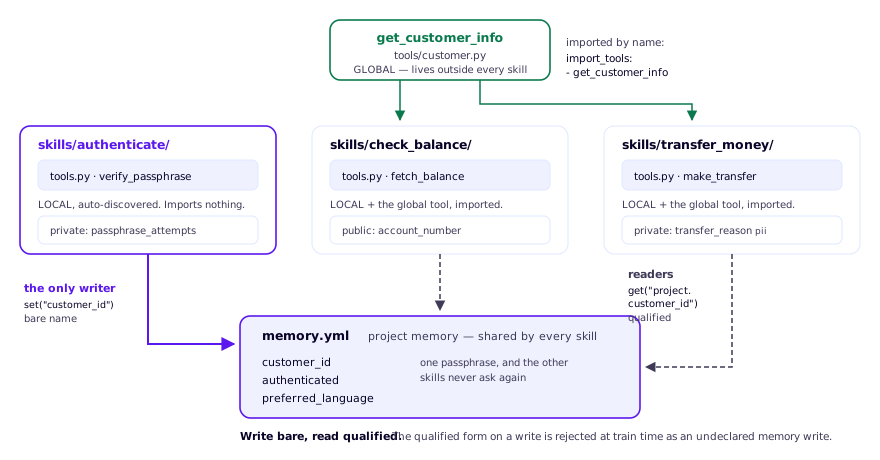
In the companion, the tools write customer_id using its bare name and read
it as project.customer_id. Follow that convention when tracing which tool
sets the identity and which skills consume it.
| Idea | Where it lives |
|---|---|
| Local tool | skills/<skill>/tools.py — auto-discovered |
| Global tool | tools/<module>.py + import_tools: in the skill |
| Project memory | memory.yml at the project root |
| Skill memory | skills/<skill>/memory.yml, split public / private |
Before you start
You need Python 3.11 or 3.12, uv, a Rasa Pro Developer Edition licence, and an OpenAI API key. The agent is text-only on purpose: the subject is architecture, not speech.
The companion project pins rasa-pro==3.21.0.dev5, as recorded in the compatibility report. That report distinguishes current offline checks from live conversations; the illustrative dialogues in this series are not proof of a new model run.