

Scaffold a Mantle agent, train it, say hello, and it says this:
bot Hello! What can I assist you with today?Correct, and completely anonymous. If the customer is signed in, the agent already could know who they are. It just never looks.
The same gap shows up later: the bundled transactions skill makes a customer with one obvious everyday account pick from a list, every single time.
Both are the same missing piece — nothing loads what you know about the user before the conversation starts. This tutorial fixes it, and by the end the agent opens like this:
bot  Good afternoon, Jordan! It's wonderful to have you back — thanks for being
     a Premier member since 2019. How can I assist you today?
The mechanism in the middle is an ordered block, and it is what makes the difference reliable rather than usual:
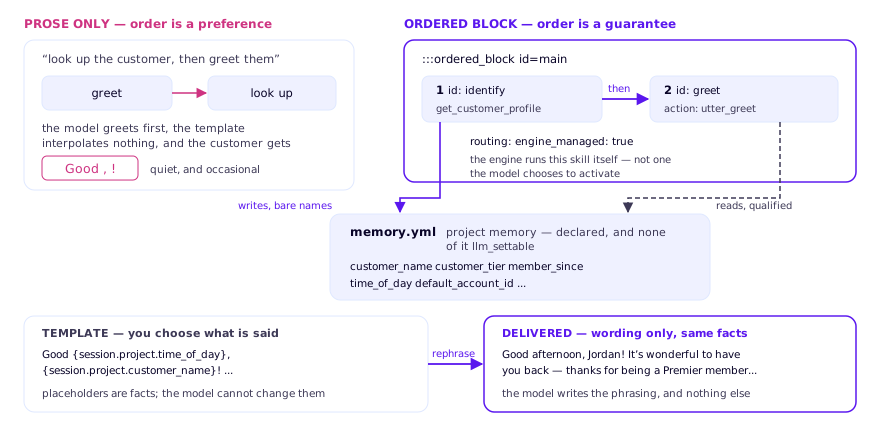
What you will build
Six changes to a scaffolded project:
| Technique | What it guarantees |
|---|---|
| Override a bundled skill | your default_session_start wins |
| Ordered block | the profile lookup happens before the greeting |
| Project memory, not LLM-settable | facts come from a tool, never invented |
| Response template | you choose exactly what is said |
rephrase: true | the model improves wording, not facts |
| Scoped instruction | the model sees only the branch that applies |
Where this came from
This is Daksh Varshneya’s session-start personalization pattern, demonstrated live at Rasa community office hours and published to the community resources repository. This tutorial rebuilds it step by step and explains why each piece is where it is.
Before you start
Python 3.11 or 3.12, uv, a Rasa Pro Developer
Edition licence, and an OpenAI API key. The companion project pins
rasa-pro==3.21.0.dev5 (kept in sync with the catalog); the transcripts were
captured on 3.20.0.dev1, earlier on the same release line.
Chapter 5 covers what changes if you are coming from 3.19.x, where the engine
package was called rasa.calm_v2 before it was renamed to rasa.mantle.