

You will build Juniper, a fictional plant-shop assistant, with the Mantle starter pack. It supplies authoring guidance for Claude Code, a configuration checker and a commit hook to help you catch mistakes as you work.
A project can install and run while ignoring a misplaced setting. This series shows how to check the configuration as well as trying the conversation. The earlier catalog audit below explains why that check matters.
An earlier catalog audit found 39 behavioral rules across project config files. Things like “never state a balance that did not come from a tool.” The engine applied zero of them. No error at load. No warning at train time. The agents just ran without their guardrails, for weeks, until someone read the built prompt and noticed the rules weren’t in it.
The cause? The rules were indented two spaces too deep. Mantle parsed them, found them in a spot it doesn’t read from, and silently threw them away.
That is the kind of mistake this tutorial is about. Not the loud ones — Mantle tells you about those. The silent ones: config that parses, trains, runs, and quietly does the wrong thing.
What the starter pack is
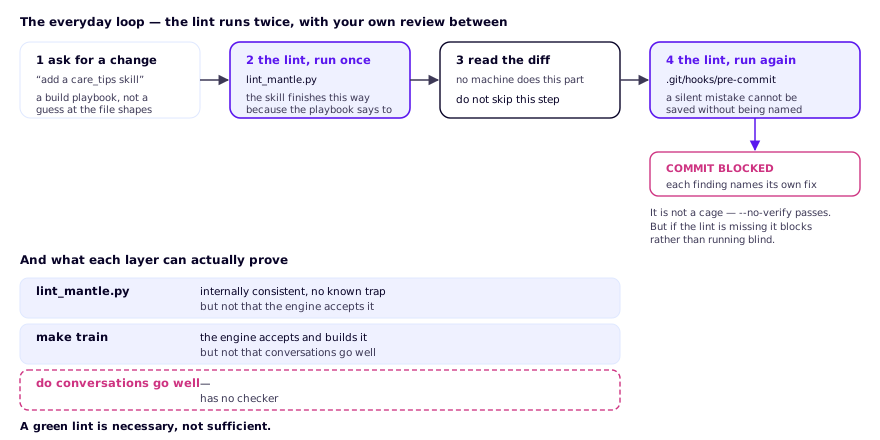
The starter pack is three tools that share one idea — every known silent mistake should be caught by a machine, not by weeks of confusion:
- Six Claude Code skills — playbooks that teach an AI assistant the correct 2026 file shapes, so “scaffold me an agent” produces config that is right the first time.
- A lint —
lint_mantle.py, a single-file checker with ten checks. Every check encodes a failure a real project in the companion catalog actually hit. The 39-ignored-rules bug is check number one. - A git hook — a one-time install that runs the lint on every commit, so a silent mistake cannot even be saved without being pointed out.
The three pieces meet in the everyday loop, where the lint runs twice — once when the change is built, once when it is committed — with your own reading of the diff in between:
What you will build
Juniper, a small plant-shop helper with two skills and a memory:
you  do you have anything that survives a dark bathroom?
bot  Yes — a ZZ plant or a snake plant would be happy there.
     Want me to check what's in stock?

you  yes please
bot  We have 4 ZZ plants and 7 snake plants in stock right now.

you  I'll take a ZZ plant
bot  Great choice. I've noted a ZZ plant for you — ask me anytime
     to check your order.
More importantly, in Chapter 3 you will break Juniper on purpose, seven different ways, and inspect the checker’s diagnostics. Some settings are silently ignored; others fail at training or installation. That chapter is the reason this tutorial exists: once you have seen a silent failure get caught, you understand why the guardrails earn their place.
The chapters
| # | Chapter | You will |
|---|---|---|
| 1 | The safety net | Install the pack, meet the lint, wire the git hook |
| 2 | Scaffold Juniper | Generate the agent and understand every file it makes |
| 3 | Break it on purpose | Inspect the diagnostic for each configuration mistake |
| 4 | Run it, review it, keep it healthy | Train, chat, and adopt the everyday workflow |
Before you start
- Python 3.11 or 3.12 — Mantle requires ≥ 3.11 (and Chapter 3 shows you the deeply confusing error you get when you ignore this).
- uv and git.
- Claude Code for Chapters 2–4. (The lint and hook work without it; the scaffolding skills are what need it.)
- A free Rasa Pro Developer Edition licence and an OpenAI API key — only needed from Chapter 4, when Juniper first runs.
The installation targets rasa-pro==3.21.0.dev5. The
compatibility report records the current automated checks;
recorded terminal examples are illustrations, not a claim that every live model
run repeats identically. The release audit checks the published wheel for the
Mantle engine and reports the stable channel separately. Chapter 3 explains why
an arbitrary stable pin is not a substitute for the tested runtime.
Where everything lives
- The pack itself:
starter-pack/in the community resources repo. - The catalog whose real failures the pack distills:
RasaHQ/rasa-community-resources— its ownscripts/lint_repo.pyopens with the line “Every check here encodes a failure this repository has actually hit.” This tutorial is that sentence, taught.