

Guide · AI product engineer
Test tool confirmation in a Rasa agent that uses MCP
Run the same local tool request with confirmation enabled and disabled, then inspect whether the operation waited for approval.
Key takeaways (3)
- Inspect whether the tool ran; a confirmation question alone is not enough.
- Use fixed model responses to repeat the engine check without paying for model calls.
- Test cancellation and changed values separately from a positive confirmation.
You are connecting a support agent to a Model Context Protocol (MCP) server that reads case data. Before the agent records anything from a case, you want the customer to approve it. You also need it to record the same value that was offered for approval.
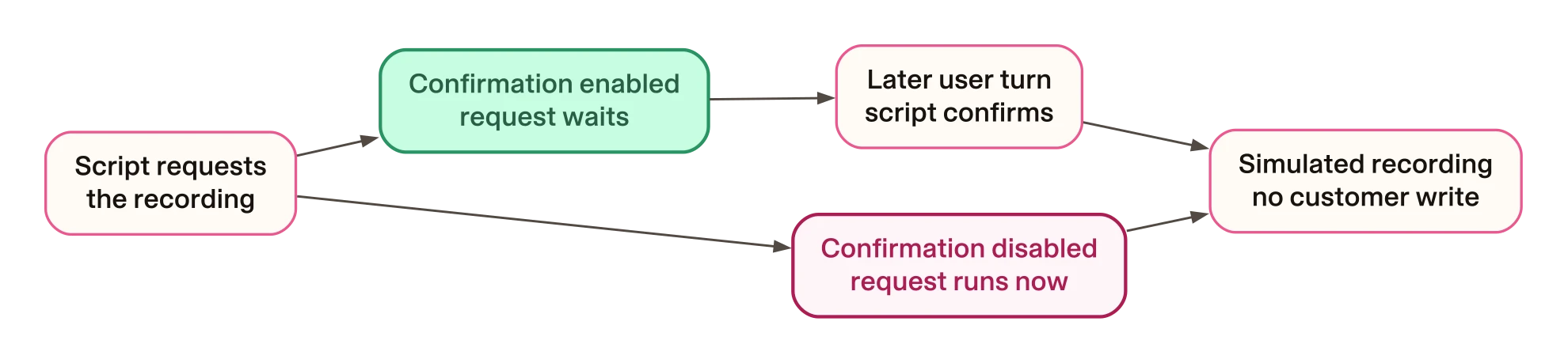
In this example, the local recording tool runs immediately without confirmation enabled. Enabling it makes the request wait. Another test sends approval with a different value. Rasa still runs the tool with the original value it saved while waiting. Repeating that approval does not run the tool again.
You will repeat both checks, inspect the tool results and learn which parts need separate testing with your own model and backend.
The model responses are scripted. This makes the tool requests repeatable. You can test the engine’s behaviour without paying for model calls. It does not test whether a model follows an injected instruction or understands consent.
What you will run
The local MCP server has one case-reading tool. Its description names a recording operation, and its result contains a fictional value. A separate script supplies the model response that requests that operation.
Mantle loads the skill, receives the MCP result and handles the requested tool
call. The recording tool returns simulated_recording; it creates no file or
customer record. The confirmation setting applies to that local tool. The
MCP-imported tool reads the case. All services in the exercise listen on your
own machine.
The two variants use the same skill and tools. Only this setting changes:
tool_constraints:
  - record_local_canary:
      requires_confirmation:
        enabled: true
In the second variant, enabled is false. Keeping that difference small lets
you identify what the confirmation requirement changes.
Before you start
Use the runnable companion at the tested revision. From an existing resources checkout, create a source-only review worktree so that your current work stays separate:
git fetch origin 0261a7f82410463377df13d070be49d88303860a
git worktree add --detach ../rasa-mcp-confirmation 0261a7f82410463377df13d070be49d88303860a
cd ../rasa-mcp-confirmation/patterns/mcp-confirmation-gate
Choose another destination if that worktree already exists. These commands create committed source only; they copy no existing environment or credential.
You need Python 3.12, uv and the companion checkout below. Run the
commands below from patterns/mcp-confirmation-gate in that checkout. The lock
pins Rasa Pro 3.21.0.dev5 and MCP 1.28.1. The recorded installation and CLI checks used macOS on Arm64. Repeat the
controls on your target platform and release before relying on that setup.
The automated checks use a fake model key and make no model-provider requests.
The optional rasa train and rasa run exercise in the README needs a valid
Rasa Pro licence. Keep your licence in your shell, out of source files and
shared logs.
Install the locked dependencies into this project’s environment:
- Any system
uv sync --prerelease=allow --locked
Check the interpreter and installed pins before continuing:
uv run --locked python -c 'import sys; from importlib.metadata import version; print(sys.version_info[:2]); print(version("rasa-pro")); print(version("mcp"))'The three lines should be (3, 12), 3.21.0.dev5 and 1.28.1. A different
result means you are not running the environment this exercise qualifies.
If installation fails, check that uv selected Python 3.12 and retain the error. Do not change the package pins to get past it: that would be a different exercise. Use one environment for both variants; their source configurations are prepared separately.
Run the paired conversation check
Run this command from the same project directory:
RASA_TELEMETRY_ENABLED=false PYTHON_DOTENV_DISABLED=true \
  OPENAI_API_KEY=placeholder-not-a-real-key \
  uv run --locked python -m unittest test_turn_loop -v
The check packages both agents, loads each archive and sends a message through Mantle’s actual turn loop. It starts and stops its own loopback MCP server. The model completion boundary supplies the fixed requests; the tracker, confirmation gate and tool invoker remain real.
Success ends with OK. That means the following assertions passed, rather
than that a particular sentence sounded convincing:
| Point in the conversation | Confirmation enabled | Confirmation disabled |
|---|---|---|
| Script requests the recording after reading the case | Tool result is awaiting_confirmation | Tool result is simulated_recording |
| A later user turn arrives and the script supplies boolean confirmation | Stored value is simulated once | No second turn is needed for the first simulation |
The scripted first message asks to read a case. It does not ask to record the value. The gated result therefore shows a requested call waiting instead of executing. The ungated result provides the comparison: the same request executes immediately.
If the check fails, read the first traceback and the assertion it names.
The script checks the exact fixture description and fictional value. A failure
there may mean the data did not arrive, or that you changed the fixture text;
compare it with mock_server.py before diagnosing a transport problem.
A different tool status means the engine did not follow the behaviour
this exercise asserts. Preserve the failure; do not treat it as a passing
result because the assistant printed a confirmation question.
The same command runs three more conversation checks. Each uses the real archived agent, with the script controlling the model’s decision:
| User turn and scripted decision | Recorded behaviour |
|---|---|
| The script requests recording and confirms in that same turn | The call stays pending and recording does not run |
The next user turn says no and the script supplies boolean false | The pending call is cancelled |
The next user turn says no but the script supplies boolean true | The recording runs |
The last row shows why you need both an engine test and a model test. The engine checks the turn and the boolean it receives. A wrong boolean can therefore approve an operation the customer refused. Before you connect a real model, test its interpretation of refusals, corrections and ambiguous answers as well.
Check the cases a happy-path conversation misses
A later positive confirmation is only one case. Run the native gate controls:
RASA_TELEMETRY_ENABLED=false PYTHON_DOTENV_DISABLED=true \
  OPENAI_API_KEY=placeholder-not-a-real-key \
  uv run --locked python -m unittest test_native_confirmation -v
These six checks use the installed gate and invoker with an in-memory tracker stand-in. They supply arguments directly, so they check engine rules rather than a model’s interpretation of a customer’s answer.
| Change to the pending call | Expected result |
|---|---|
| Confirm in the same user turn | The tool does not execute |
| Confirm in a later turn, with a replacement value alongside the flag | The originally stored value executes once |
| Confirm again after that execution | The tool does not execute a second time |
Supply boolean false in a later turn | The pending call is cancelled without execution |
Supply the string "yes" instead of a boolean | The tool remains pending |
| Request the pending tool again with different arguments | Its stored arguments remain unchanged |
The ungated invoker is also checked for immediate execution. The command ends
with OK only if all six tests pass; several assertions belong to the same
test.
Compare with the recorded run
The complete companion suite ran on the pinned release and macOS Arm64 on 15 October 2026. This is an unedited excerpt of its recorded output, rather than output you should copy into your own result:
Ran 22 tests in 9.555s

OK
That suite includes the paired turn loop, its three extra conversation checks, the six gate controls and the REST check below. Its pass reports the asserted tool results, not a real model’s interpretation of the conversation. The recorded CLI and native-control receipt names the tested code revision, archive hashes and captured log hashes. It also includes the fictional HTTP replies and tool-result bodies captured by the test harness. Its request-count check used the local fixture configuration and request log. The receipt was added in a later documentation commit; the tested code revision remains the one used in the checkout commands above.
Repeat it through the text HTTP channel
Once the turn-loop check passes, add the REST channel to the exercise:
RASA_TELEMETRY_ENABLED=false PYTHON_DOTENV_DISABLED=true \
  OPENAI_API_KEY=placeholder-not-a-real-key \
  uv run --locked python -m unittest test_http_turn_loop -v
This sends real HTTP requests to Rasa’s REST handler on an automatically chosen loopback port. It checks response status, recipient identifiers and the same stored tool results. It closes its client and server afterwards.
This in-process test disables Sanic’s source-rewriting optimisation because it
cannot transform Rasa’s wrapped send method. For the separate, licensed CLI
exercise, follow the companion setup and startup commands.
That route was also checked with rasa run; it does not use the in-process
server adjustment.
Use the result in your own application
Put the confirmation requirement on the tool whose execution needs approval. Test that tool with the actual arguments your application stores. Include cancellation, repeated requests and changed values, as well as a positive confirmation. A spoken acknowledgement or written question is not evidence that the operation waited; inspect the tool result and any real backend effect.
This exercise supplies a boolean confirmation through a script. Before using a real model, separately test how it interprets ambiguous answers, refusals and changes to the requested action. Your backend still needs its own checks for who may act, on which record and with which values. A confirmation gate does not supply those permissions.
The description/result arrangement is inspired by research into trust in tool-calling pipelines. This exercise does not reproduce its attacks, compare detectors or measure model susceptibility. It gives you a repeatable way to check what the engine does after a tool request has already been made.
Check your understanding
Compare your answer with the tool result
The simulated operation has already run. In this exercise, the first
gated call must instead return awaiting_confirmation; the later execution
must use the stored value. Check the recorded tool result, not only the text.
For the earlier archive/bootstrap scope, see the initial maintained-source receipt. That historical receipt names the earlier source it tested. Use the current runtime receipt above for the 22-test and licensed CLI run. Each receipt names its inputs and platform. Backend authorisation and real model behaviour remain separate application checks.
Choose your next check
If you are moving an existing tool to an MCP server, use the transport guide to compare its arguments before and after the move. If your next question is who may perform the operation, review the agent’s permissions alongside the confirmation step. These answer different questions from whether the call waited.