

Guide · AI product manager
Is an MCP server a drop-in replacement for your tools?
Before you approve a move of agent tools to an MCP server, check where each tool now gets the customer id it acts on.
Key takeaways (3)
- A passing check that the instructions did not change says nothing about what the tools underneath now do.
- List each new tool’s required arguments. A customer id there is now a value the agent supplies.
- Keep tools that act on a customer local until their id can be bound outside the model.
You are moving your agent’s CRM tools onto an MCP server. MCP, the Model
Context Protocol, lets an agent call tools that run on a separate server. The
pull request is small. It adds a server entry to the config. Two skills gain
an import_tools entry that points at the server, and the third has its
import line rewritten. The old tool code is moved aside.
It also comes with a proof script, and the proof passes. This is part of its output, trimmed:
  1. skill instructions are unchanged by the swap
  ✓ check_tickets: only import_tools differs     2 changed line(s)
  ✓ check_tickets: instruction body byte-identical 687 bytes

  The transport changed. The instructions did not.
Can you approve it as an ordinary config change? Not yet. First list the arguments each new tool requires, and decide for each customer id where it may come from. That matters if a tool reads or writes a customer’s record. A wrong id there can mean a tool returns another customer’s tickets, or writes a note on another customer’s record.
In the example below, two of the three tools changed this way.
Why the passing proof is not enough
In Rasa, an agent’s tasks live in skills. A skill is a folder with the
model’s instructions in skill.md, plus the tools that task uses. Project
memory is where the agent keeps values such as the identified customer’s id.
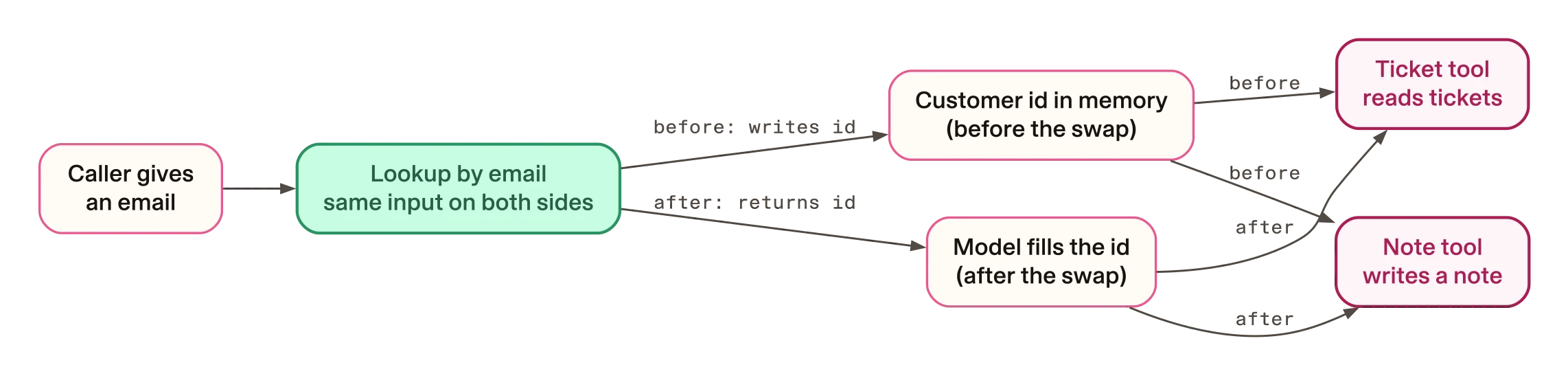
Before the swap, the tools were local Python tools in the project. The lookup
tool found the caller by email and wrote their customer id into project
memory. The ticket tool and the note tool read the id from there. This excerpt
is the start of the ticket tool, from skills/check_tickets/tools.py:
async def list_open_tickets(context: ToolContext = None) -> ToolResult:
    """Read the caller's tickets from the CRM."""
    contact_id = context.memory.get("project.contact_id") if context else None
An MCP tool cannot read project memory. A local tool receives a
ToolContext, the object that gives it memory access. An MCP tool does not,
so the id has to arrive as an argument. The companion’s README says the model
“fills it from the conversation”. This excerpt is the same tool on the
companion’s MCP server, scripts/mcp_crm_server.py:
@mcp.tool(description="List the support tickets on the identified customer's account.")
async def list_open_tickets(contact_id: str) -> CrmResult:
    """Read the caller's tickets from the CRM.

    Args:
        contact_id: HubSpot contact id of the identified customer.
    """
    # `contact_id` is a PARAMETER here, not a memory read. An MCP tool has no
    # ToolContext, so the value has to travel as an argument. See the README
    # section "What MCP does not do for you".
    if not contact_id:
        return CrmResult(ok=False, error="not_identified")
The note tool changed the same way. Locally it took only the note text. Over MCP it takes the customer id too.
This is the pattern to look for. When a value that used to come from server-held state now arrives as a tool argument the model fills in, it has moved to the model’s side of the trust boundary.
What a different id does
We called the companion’s MCP tools directly, with no model and no conversation. The script identifies the caller as Sam Rivera, then passes Dana Okafor’s id, 701, to the ticket and note tools. Both servers were the companion’s local mocks. The output, unedited:
$ uv run python scripts/call_with_other_id.py 2>/dev/null
call_tool find_contact_by_email {'email': 'sam.rivera@example.com'}
  -> {'ok': True, 'contact_id': '702', 'name': 'Sam Rivera', 'company': 'Rivera Foods'}
call_tool list_open_tickets {'contact_id': '702'}
  -> {'ok': True, 'count': 0, 'tickets': []}
call_tool list_open_tickets {'contact_id': '701'}
  -> {'ok': True, 'count': 2, 'tickets': [{'id': '9001', 'subject': 'Invoice 4471 shows the wrong VAT rate', 'stage': 'waiting_on_us', 'created': '2026-08-11'}, {'id': '9002', 'subject': 'Add a second admin to the account', 'stage': 'waiting_on_contact', 'created': '2026-08-19'}]}
call_tool add_timeline_note {'contact_id': '701', 'summary': 'Sam asked to close his account.'}
  -> {'ok': True, 'note_id': '10000'}
mock CRM stored note 10000: body='Sam asked to close his account.' on contact ['701']
The ticket tool returned Dana’s tickets, and the note about Sam was stored on Dana’s record. This shows what the tools do with a given id, not that a model would pass the wrong one.
What the proof checked instead
The proof’s first check finds each skill’s instructions byte-identical. So
the MCP version of skills/check_tickets/skill.md still says this:
Call `list_open_tickets`. It reads the identified customer from project memory,
so it is the authority on whether the caller has been identified yet.
The memory read that sentence describes was in a file the swap moved aside. The proof checked that the sentence survived, not that it is still true.
The proof is also looser than it looks on the settings block at the top of
each skill file. It accepts any changed settings line that starts with - ,
whatever it sits under. We moved the note skill’s confirmation rule from the
write tool to the ticket tool with a one-line change. Our diff, unedited:
@@ -6,7 +6,7 @@
 import_tools:
   - mcp/hubspot_crm:add_timeline_note
 tool_constraints:
-  - add_timeline_note:
+  - list_open_tickets:
       requires_confirmation:
         enabled: true
         utter_for_confirmation: utter_confirm_note
The proof still reported every check green and exited with status 0.
How to check your own swap
Do this for every tool your agent will call over MCP. In your own project,
the files are the skill files that gain an import_tools entry, the
integrations file and the local tool code the swap removes.
List the required arguments of each tool
Ask for the tool list from the MCP server you will use, with each tool’s required arguments. Pick the server you are checking:
Your vendor's server
The required arguments are in the tool schemas the server publishes. An MCP
client gets them with a list_tools call. In the Rasa Pro source, that is
also the call Rasa makes when the agent starts. Ask the engineer for that
list, one line per tool, before the review.
The companion's mock server
You need git and uv. These commands fetch the companion at the pinned
revision:
git clone https://github.com/RasaHQ/rasa-community-resources.git
cd rasa-community-resources
git checkout 69e27b6
cd tutorials/rasa-hubspot-crm-tutorial
Then this command asks the mock server for its tools. The 2>/dev/null hides
a library warning. We ran it in a git archive export of the same revision
with its environment already installed, not in a fresh clone. Our run,
unedited:
$ uv run python -c 'import asyncio, scripts.mcp_crm_server as s
for t in asyncio.run(s.mcp.list_tools()): print(t.name, "requires", t.inputSchema["required"])' 2>/dev/null
find_contact_by_email requires ['email']
list_open_tickets requires ['contact_id']
add_timeline_note requires ['contact_id', 'summary']
A customer or account id in a required list is a value your agent now has to pass in.
Fill in one row per tool
For each tool, write down what it acts on, where its id came from before and where it comes from now. For the companion, the table looks like this:
| Tool | Acts on | Id before the swap | Id after the swap | If the id is wrong |
|---|---|---|---|---|
find_contact_by_email | Finds a customer | Caller’s email | Caller’s email | No change: the input is the same |
list_open_tickets | Reads tickets | Customer id in memory | Argument to the tool | Can return another customer’s tickets |
add_timeline_note | Writes a note | Customer id in memory | Argument to the tool | Can write the note on another customer’s record |
The question for each row comes from the companion’s README. Does the tool’s correctness depend on a value “the user must not be able to influence”? If so, the README’s rule is to keep that tool local.
Decide where each id may come from
For each tool whose id moved, there are three options.
Keep the tool local. It still reads the id from memory, so its instructions stay true. In the companion, the local lookup is the only code that writes the id to memory, so it must stay local too. Then none of the three CRM tools moves.
Bind the id outside the model. In the Rasa Pro source, both 3.20.0rc1 and 3.21.0.dev5, a fixed step can fill a tool argument from a memory value, so the model never supplies it. We found no setting that does the same for an MCP call the model makes itself. Something trusted must still write the id to memory, and in the companion only the local lookup does. A vendor’s server might instead tie a call to the caller’s own session; that is a question for the vendor, and the companion’s mock does not. We did not test either route.
Accept the id as an argument. Write down what a wrong id costs for this tool. Then add conversation tests where the caller names another customer. For a write, decide whether a sampled test result is enough.
This guide recommends keeping any tool that acts on a customer local until its id can be bound outside the model. In the companion, the price is that no CRM tool moves to MCP yet.
Check fixed steps that call a moved tool
A skill can fix some steps so they run in order. The companion’s note skill
ends with a fixed step that calls the write tool with only the note text. This excerpt is from the MCP version of
skills/log_interaction/skill.md:
  - id: write_note
    execute_tool: add_timeline_note
    parameters:
      summary: session.log_interaction.note_summary
The MCP tool also requires the customer id. We ran Rasa Pro’s own argument check offline against the mock’s schema, without and then with an id. Our output, unedited:
write_note step as shipped: {'summary': 'Dana asked about invoice 4471.'}
  -> {"error": "Invalid tool arguments: Missing required argument(s): 'contact_id'.", "retryable": true, "code": "invalid_arguments"}
with contact_id added: {'contact_id': '101', 'summary': 'Dana asked about invoice 4471.'}
  -> None
In the Rasa Pro source, a step that fails this check does not call the tool. It hands the turn back to the model. That check comes before the confirmation, so on this path the caller is not asked. We read this in the source and did not run it against a model. In a live run, the model might stall, or it might call the tool itself with an id it chose.
Fix instructions that describe the old behaviour
Search each skill’s instructions for sentences about where a value comes from. If the ticket tool moves, rewrite its sentence about memory to match. The companion proof’s first check then goes red and needs updating too.
How to check the fix works
Run the proof. It checks the instruction text and the mock server, not the ids. The full output is folded at the end of this page.
- Any system
make mcp-prove
Start the agent against the real server. Use the same server name and
import lines, outside production. In the Rasa Pro 3.20.0rc1 source, loading
the model does not check whether the server offers each imported tool. That
check runs when the agent starts and connects. A missing tool raises this
error, quoted from rasa/mantle/tools/mcp_runtime.py as an excerpt:
            if tool_schema is None:
                raise ValueError(
                    f"MCP server {reference.server_id!r} does not expose imported "
                    f"tool {reference.tool_name!r} for skill {skill_id!r}."
                )
In the same source, Rasa then stops loading the agent rather than return one without its MCP tools.
The error is loud, but it comes after the proof has passed.
Test the conversation. Write tests where the caller gives one email and then names another customer. The companion has no test files, so this is new work.
Read the settings diff yourself. The proof accepts a confirmation rule
moved to the wrong tool. Check each tool_constraints entry by eye.
Who reviews what
This guide recommends splitting the work. Each id decision needs a reviewer who did not write the diff; your organisation decides who. If you scoped the workflow with a written boundary, as in choosing an agent workflow worth building, check that boundary against the tools here. For the companion:
| Ticket | Evidence | Done when |
|---|---|---|
| Config change | The proof output | The proof passes, and the agent starts against the real server |
| Ticket tool id | The schema listing and the README’s rule | One of the three options, signed off |
| Note tool id | The schema listing and the argument-check output | One of the three options, signed off, and the fixed step fixed |
| Instruction accuracy | The ticket skill’s sentence about memory | The sentence matches the tool that ships |
Limits
- This covers one companion project and its local mock. It says nothing about how any vendor’s MCP server behaves.
- It asks one question: where each id comes from. It is not a security review of the vendor, the transport or the data.
- Neither version checks that the caller owns the email they give.
- The direct tool calls show what the tools do with a given id. The Rasa behaviour at agent start and after a failed step comes from reading the source. We made no live run, so whether a model passes the right id is untested.
- The CRM transport swap tutorial is the engineer’s walkthrough of this swap. Its chapters 3 to 5 say the swap keeps the instructions working and moves one tool’s id. The evidence here shows two tools’ ids moved, one of them a write.
Questions you may hear
Can we move only the lookup to MCP and keep the other two tools local?
Not as the companion is written. The only code that writes the customer id to
memory is the local lookup. The project’s memory.yml does not let the model
set the id, because llm_settable defaults to false in Rasa Pro 3.20.0rc1. A
search of the project found no other writer. Move the lookup and nothing
writes the id, so the local ticket and note tools return not_identified.
Does any of this change with a real vendor server?
The question stays the same, but the answers come from the vendor’s tool schemas, not the mock’s. Ask for the required arguments of every tool the vendor publishes, and fill in the table from that. Also ask whether the server can tie a tool call to the caller’s own session.
Show the full proof output
We ran make mcp-prove once on macOS, in an export of the pinned revision
rather than a fresh clone. The output, unedited:
  Proving: the same three skills keep their instructions while
  tools/crm.py is replaced by import_tools: mcp/<server>:<tool>.
  No licence, no API key, no HubSpot account, loopback only.

  1. skill instructions are unchanged by the swap
  ✓ check_tickets: only import_tools differs     2 changed line(s)
  ✓ check_tickets: instruction body byte-identical 687 bytes
  ✓ identify_customer: only import_tools differs 2 changed line(s)
  ✓ identify_customer: instruction body byte-identical 804 bytes
  ✓ log_interaction: only import_tools differs   2 changed line(s)
  ✓ log_interaction: instruction body byte-identical 1226 bytes

  2. integrations.yml parses as MCP server configuration
  ✓ parse_mcp_servers accepts the file           servers: ['hubspot_crm']
  ✓ server url is loopback http                  http://127.0.0.1:8931/mcp

  3. each skill's import parses as mcp/<server>:<tool>
  ✓ check_tickets imports list_open_tickets      server=hubspot_crm llm sees 'list_open_tickets'
  ✓ identify_customer imports find_contact_by_email server=hubspot_crm llm sees 'find_contact_by_email'
  ✓ log_interaction imports add_timeline_note    server=hubspot_crm llm sees 'add_timeline_note'

  4. every imported server is configured
  ✓ no skill imports an unconfigured server      ['hubspot_crm'] ⊆ ['hubspot_crm']

  5. the MCP server exposes the imported tools
  ✓ server exposes list_open_tickets             imported by check_tickets
  ✓ server exposes find_contact_by_email         imported by identify_customer
  ✓ server exposes add_timeline_note             imported by log_interaction

  6. a tool call over MCP returns the CRM fact
  ✓ result is structured, not text blocks        outputSchema published
  ✓ find_contact_by_email over MCP               Dana Okafor at Okafor Logistics
  ✓ absent contact is not an error               error=contact_not_found

  The transport changed. The instructions did not.
We did not run it on Linux or Windows.
Show the script behind the direct tool calls
The script runs the companion’s mock CRM and MCP server on loopback, with the
fake CRM token the companion proof also uses. It calls the tools with the MCP
client library and prints what the mock CRM stored. We ran it in an export of
the companion with no .env file, in an environment holding only HOME and
PATH. Save it as scripts/call_with_other_id.py in the companion folder:
import asyncio, os, socket, subprocess, sys, threading, time
from http.server import HTTPServer

ROOT = os.path.dirname(os.path.dirname(os.path.abspath(__file__)))
sys.path.insert(0, ROOT)
import scripts.mock_hubspot as crm  # the bundled mock CRM, run in this process
from mcp import ClientSession
from mcp.client.streamable_http import streamablehttp_client

def wait(port):
    for _ in range(100):
        try:
            socket.create_connection(("127.0.0.1", port), timeout=0.5).close(); return
        except OSError:
            time.sleep(0.15)
    raise SystemExit(f"port {port} did not open")

async def main():
    async with streamablehttp_client("http://127.0.0.1:8931/mcp") as (r, w, _):
        async with ClientSession(r, w) as s:
            await s.initialize()
            async def call(name, args):
                res = await s.call_tool(name, args)
                print(f"call_tool {name} {args}")
                print(f"  -> {res.structuredContent}")
                return res.structuredContent
            who = await call("find_contact_by_email", {"email": "sam.rivera@example.com"})
            other = "701"  # Dana Okafor's contact id in the mock CRM, not the caller's
            await call("list_open_tickets", {"contact_id": who["contact_id"]})
            await call("list_open_tickets", {"contact_id": other})
            await call("add_timeline_note", {"contact_id": other, "summary": "Sam asked to close his account."})
    for note in crm.NOTES:
        p = note["payload"]
        print(f"mock CRM stored note {note['id']}: body={p['properties']['hs_note_body']!r} "
              f"on contact {[a['to']['id'] for a in p['associations']]}")

server = HTTPServer((crm.HOST, crm.PORT), crm.Handler)
threading.Thread(target=server.serve_forever, daemon=True).start()
env = {"HOME": os.environ["HOME"], "PATH": os.environ["PATH"],
       "HUBSPOT_BASE_URL": f"http://{crm.HOST}:{crm.PORT}", "HUBSPOT_ACCESS_TOKEN": "mock-token"}
mcp_proc = subprocess.Popen([sys.executable, os.path.join(ROOT, "scripts/mcp_crm_server.py")],
                            env=env, stdout=subprocess.DEVNULL, stderr=subprocess.DEVNULL)
try:
    wait(8931); asyncio.run(main())
finally:
    mcp_proc.terminate(); mcp_proc.wait(timeout=5); server.shutdown()
The script’s module docstring is left out here. This is the run command,
with our uv folder replaced by a lookup of where uv is installed:
env -i HOME=$HOME PATH=/usr/bin:/bin:$(dirname $(command -v uv)) uv run python scripts/call_with_other_id.py 2>/dev/null