

Guide · AI product engineer
How to make sure your agent sends the confirmation number
If your LLM agent completes an action but the customer never sees the reference, have the tool send it in the same turn.
12 of 12
claim references the customer saw in the same turn when the tool sent them
2 of 5
claim references the customer saw in the same turn when the model was told to
Key takeaways (3)
- Even when told to, the model often ends its turn without repeating the reference.
- Have the tool that completes the action send the reference to the customer itself.
- Test what the customer saw: each reference should appear in a bot message in the same turn.
Your agent files a claim, books a seat or records a payment plan. The action works. But the customer never sees the reference that confirms it.
For a bank or telco customer, that can mean calling back to check, making the same request twice, or having no proof they asked.
Sending a confirmation from code is not a new idea. What the sample runs show is that telling the model to give the reference was not enough, and that the usual tests did not notice.
The sample insurance claims agent used here has an on and off switch,
TOOL_SENDS_RECEIPT. When it is on, the tool that files the claim sends the
reference to the customer itself. Here is the same scripted conversation,
recorded once with the switch off and once with it on:
Avoid: Switch off: the reference is left to the model
Customer: Yes, that’s accurate.
Bot: Is there anything else you’d like a hand with today?
The claims system had filed the claim and returned HC-CLI-66398. It was in the tool’s result, but in no message of this turn. It arrived one message later, only because the scripted customer typed again.
Prefer: Switch on: the tool sends the reference
Customer: Yes, that’s accurate.
Bot: Claim filed: HC-CLI-68316, for water damage on 2026-09-26 under policy HC-HO-552104. Received: photos of the damage, repair estimate or invoice. Still needed: nothing. Coverage has not been decided; a claims handler reviews the claim next.
Bot: Is there anything else you need help with today?
This is a separate run, so the claims system issued a new reference. The first message comes from the tool, not the model.
The same turn is the bar. A customer turn is one customer message and everything the agent sends back before the next one. If the reference comes only when the customer happens to write again, a customer who does not write again never gets it.
The fix is to have the tool that completes the action send the reference itself.
Why the reference goes missing
In a Rasa agent, a tool does the work and returns a result to the model. The model reads the result and decides what to say. Rasa sends some messages itself, such as the read-back of the report and the wrap-up question. But in this design, only the model could pass the reference on.
The model can also end the task without saying anything. A skill is a task
the agent knows how to do, written as step-by-step instructions. The model
closes it by calling complete_skill, a tool Rasa provides. Rasa then asks
its usual “anything else?” question, and the reference stays in the tool
result.
Telling the model to give the reference does not reliably fix this. In the claims sample, the skill said to give it, and so did the tool result. Even so, only 2 of 5 claim references reached the customer in the same turn. That comes from a handful of scripted conversations, so read it as a warning, not a rate.
Other samples that left the reference to the model show the same pattern. In a returns agent, 3 of 25 return authorisations reached the customer in their turn. In a bank transfer agent, 3 of 12 transfer references never reached the customer at all. In a voice agent, a rule against closing without text did not help: identity-desk references spoken in their turn went from 1 of 5 to 0 of 4.
In every sample in the companion repository where the tool sent the reference, every reference arrived in its turn.
One sample also had a hook that reads the model’s reply before the customer sees it and can replace it. That could not help here. When the model closes the skill without text, there is no reply to read.
The same applies outside Rasa. In any stack where the model writes the last message after an action, the reference depends on the model. Rasa lets a tool message the customer directly, so the fix takes a few lines. The per-turn check later in this guide works on any conversation log that records each message and tool result in order.
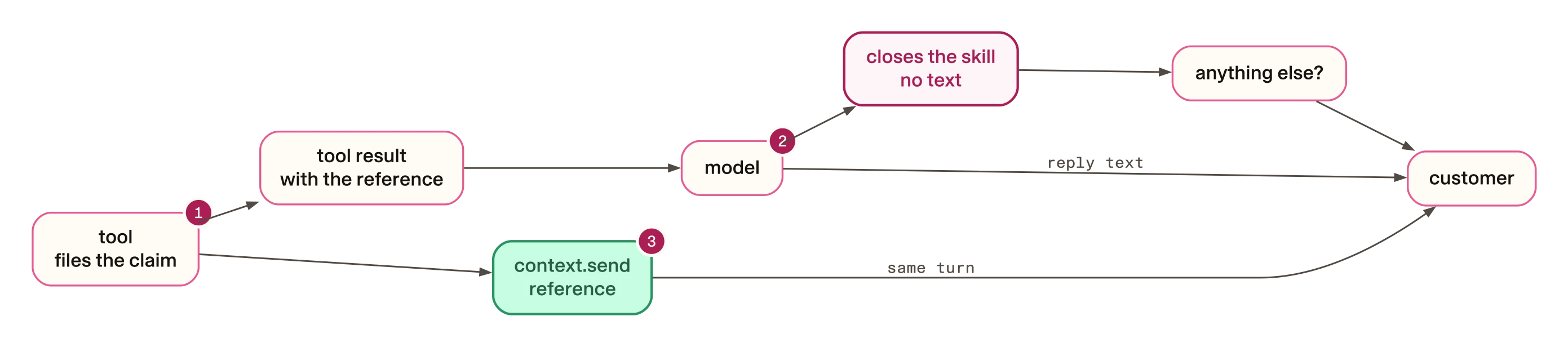
- The tool files the claim and puts the reference in its result.
- The model reads the result. It either writes the reference or closes the skill without text.
- With the fix, the tool also sends the reference itself, whatever the model does next.
How to send the receipt from the tool
In this guide, the receipt is the message that carries the reference. A Rasa
tool can send it through a ToolContext. Your
tool gets one only if its function declares a context: ToolContext
parameter. Rasa then passes one in each time the tool runs. It gives the tool
the conversation’s memory and history.
The sample’s claim tools import it like this:
from typing import Optional

from rasa.mantle.tools.decorator import ToolContext, tool
from rasa.mantle.tools.result import ToolResult
The send method records a message in the conversation and passes it to the
channel. On a text channel over REST, it reaches the customer with the turn’s
other messages.
Here is the sample’s helper. In this code, hc is the sample’s claims
module:
async def _send_receipt(context: Optional[ToolContext], tool_name: str, result: dict) -> None:
    text = hc.customer_receipt(tool_name, result) if hc.TOOL_SENDS_RECEIPT else None
    if text and context is not None:
        await context.send(text)
The tool that files the claim calls the helper on the line after the filing.
The @tool decorator above it, with the tool’s description, and the
docstring are left out here:
async def submit_claim_report(draft_id: str, context: ToolContext = None) -> ToolResult:
    memory = {key: (context.memory.get(key) if context is not None else None) or None for key in hc.MEMORY_KEYS}
    result = hc.submit_claim_report(_service(), _customer(context), memory, _conversation(context), draft_id)
    await _send_receipt(context, "submit_claim_report", result)
    return ToolResult(llm_response=result)
Step by step:
- The
memoryline reads the draft claim from the sample’s memory. Your tool reads whatever its action needs. - The
hc.submit_claim_reportline is the sample’s own call to its claims system. Replace it with your action. It returns a result with a status and, if the claim was filed, the reference. customer_receiptturns that result into the receipt. The text comes from the tool’s own data, not from the model.- If there is a receipt,
await context.send(text)sends it. - The tool returns the result to the model as usual. The model can still reply, but it cannot take the receipt back.
TOOL_SENDS_RECEIPT is the switch from the start of this guide. You can leave
it out, but it makes the test below easy.
customer_receipt also decides whether an outcome gets a receipt at all.
Before filing, the sample’s tool runs its own check on the claim. Blocked
means that check refused to file it. Make the same choice for each outcome
in your own tools:
| Outcome | What the tool sends |
|---|---|
| Filed | The reference, what was received, what is still needed and “Coverage has not been decided” |
| Pending | “Not filed yet”, because the claims system has not confirmed the claim |
| Blocked | Nothing, by design. No claim was filed, so the tool leaves the explanation to the model |
Three offline tests cover this. One checks that a filed claim’s receipt carries the reference and a blocked one gets none. One checks the pending receipt. One checks that the switch is on. They need no licence, model or network. Clone the companion repository and go to the sample’s folder:
git clone https://github.com/RasaHQ/rasa-community-resources.git
cd rasa-community-resources
git checkout 4aa0c4419dc193fef7a969c12d59edcf720f2606
cd examples/mantle-text-insurance-file-claim-claude
Then run the tests:
- Any system
python3 -m unittest tests.test_guard.ReceiptMessageTests -v
Here is a simplified version of the sample’s
measuring script.
Its walk function numbers every event by the customer turn it belongs to.
Messages that start with a slash, such as /session_start, do not start a
new customer turn:
def walk(tracker: dict) -> list[dict]:
    """Tracker events with the customer turn each followed (0 = first customer message)."""
    turn, out = -1, []
    for e in tracker.get("events", []):
        if e.get("event") == "user" and not str(e.get("text") or "").startswith("/"):
            turn += 1
        out.append({**e, "_turn": turn})
    return out

# Simplified: tracker is a saved tracker, e is the tool event that returned ref.
events = walk(tracker)
turn_bots = [b for b in events if b.get("event") == "bot" and b["_turn"] == e["_turn"]]
same_turn = any(ref in (b.get("text") or "") for b in turn_bots)
The script needs only Python and the sample’s own code, so it runs on saved trackers without a licence or model credentials. The sample commits the trackers from both test runs, so you can reproduce its numbers yourself. From the sample’s folder:
$ python3 case-build/case_metric.py case-build/results/2026-09-30-claude-sonnet-5.5
  claim-intake references: 12 issued, delivered 12, same turn 12, by the tool's receipt 12, by the model in the same turn 0
$ python3 case-build/case_metric.py case-build/results/2026-09-30-receipt-in-result-only
  claim-intake references: 5 issued, delivered 4, same turn 2, by the tool's receipt 0, by the model in the same turn 2
The output above is trimmed to the line that matters. Read “same turn”: 12 of
12 with the switch on, 2 of 5 with it off. The script also rewrites each
run’s case-metric.json, which does not change on a clean checkout.
What the fix costs, and how to handle it
The customer may see the reference twice. If the model also repeats it, the customer reads it twice. In some sample agents the model repeated almost every reference, and in others it repeated none.
To discourage repeats, tell the model the customer already has it. One sample voice agent does this twice. Its skill says “Do not repeat the reference”. Its tool result says “The caller has already heard this outcome and the reference.”
The runs do not prove these lines stop repeats, so check your own.
The wording is now code. The receipt is fixed text. Changing it means a code change and a deploy, not a prompt edit. In return, it says the same correct thing every time, including what the customer still needs to send.
On voice, the tool waits while the receipt is spoken. On a voice channel,
context.send returns only after the earlier speech and the receipt have
been spoken. That time counts against tool_timeout, the time limit Rasa
gives each tool call. By default it is 10 seconds.
That happened in a sample voice agent for payment plans, on a call in Spanish. A long receipt took about that long to speak. The payment plan was recorded, but the tool timed out. So the caller heard that the plan was recorded, and then that it could not be confirmed.
To handle it, raise the limit and add a test that fails if anyone lowers it.
tool_timeout is a top-level key in the agent’s agent.yml. That agent sets
it to 30 seconds:
tool_timeout: 30Its test checks that the limit is at least twice the spoken time of its longest receipt. In that agent, speech took about 3 seconds per 100 characters. A rerun with the higher limit passed the same call.
Limits
- Every example comes from a synthetic sample agent, with fictional companies, scripted customers and test services. Nothing here measures real customers.
- The samples are small. They show that the problem happens, not how often it will happen in your agent.
- On a text channel over REST, the receipt arrives with the rest of the turn’s messages, not earlier.
- On voice, Rasa drops a tool’s message if the caller has already interrupted the turn.
- Repeating the live runs needs a Rasa licence and model credentials. The receipt and timeout tests run offline with plain Python.
The samples behind this guide
Each sample’s README gives its own counts and how to rerun it.
| Sample | Folder |
|---|---|
| Insurance claims (the sample in this guide) | examples/mantle-text-insurance-file-claim-claude |
| Roadside assistance, voice | examples/mantle-voice-insurance-roadside-claude |
| Payment plans, voice | examples/mantle-voice-banking-collections-gemini |
| Payment plan authority | examples/mantle-text-payment-plan-authority-gpt |
| Statement search | examples/mantle-text-banking-statement-search-gpt |
| Healthcare intake | examples/mantle-text-healthcare-intake-gemini |
| Travel rebooking | examples/mantle-text-travel-mass-rebooking-gpt |
| Returns | examples/mantle-text-retail-return-claude |
| Bank transfers | examples/mantle-text-banking-transfer-gpt |
| Identity step-up, voice | examples/mantle-voice-step-up-authentication-claude |
| Loan servicing | examples/mantle-text-banking-loan-servicing-claude |
| Internal IT help desk | examples/mantle-text-internal-it-helpdesk-claude |