

Guide · AI product engineer
Why Rasa's memory discovery saved no facts on Claude
Why a Rasa agent on Claude answered a customer well but saved none of the facts they stated, and how to check yours.
0 of 20
times Claude Haiku made the save call when sent Rasa's request unchanged
20 of 20
times it called the save tool with both facts once the last message asked it to
Key takeaways (3)
- On Claude, the background step that saves facts a customer states kept none, while tests passed.
- Opus refused the request outright; Haiku sent back nothing, or text without the save call.
- To know whether facts were saved, check the memory itself, not the reply or the log.
A customer tells your agent their name and how they want to be contacted. The agent answers well. Later, your code looks for those facts in the agent’s memory and finds nothing.
That matters if your own code reads these saved facts. A preference the customer stated, such as “never email”, would be missing there, and so would a name they already gave.
Here is that turn from the quickstart agent, Juniper, a fictional plant shop. Its model was switched to Anthropic’s claude-haiku-4-5. Priya Nair is an invented customer. The bot lines are what the agent returned; the event lines summarise the log and the conversation record.
Customer
Hi, my name is Priya Nair and I only want updates by text message, never email. How many monstera do you have?
Bot
Got it — text only, no email. Let me check the monstera stock for you.
Tool
check_stock → {“found”: true, “plant”: “monstera”, “quantity”: 7}
Bot
We have 7 monsteras in stock. Would you like to check anything else?
Event
the background call that saves facts → HTTP 200, no content
Annotation:This call should have saved her name and her preference. The model sent back nothing.
Event
mantle.processor.discover_facts.completed, facts_count 0 (INFO)
Event
memory events in the conversation record: []
The reply is right, and the log says the step completed. But nothing was saved. Our acceptance test still passed. That is our own script: it trains the agent, runs four sample conversations and checks the replies and tool calls. It never reads memory.
The reverse also happened. In one run on claude-opus-5-5, we added a final user message to the background request, and the facts were saved. The agent still told the customer this (one of three bot messages, unedited):
bot: About updates: I can only look up stock. I can't save contact preferences or send updates by text or email, so your preference hasn't been recorded anywhere. I also can't reserve plants, take payment or place orders.If you run Rasa Pro 3.20.0 with claude-haiku-4-5 or claude-opus-5-5, do not build on these saved facts. Add a test that states a fact and then reads memory. That test is the only check here that saw the loss. We did not test another place to keep these facts, so this guide does not suggest one.
What memory discovery does
Memory discovery is a background step in Rasa’s agent runtime, Mantle. After
the agent replies, Rasa can make one more model call. That call reads the
conversation and looks for facts the customer stated, such as a name or a
contact preference. It saves them in memory under the key
system.__discovered__.
The model saves facts by calling a tool named record_discovered_facts. If
the model does not call that tool, nothing is saved.
We reproduced the problem with the quickstart agent. Its model group is set
in integrations.yml. We changed the provider and model like this; the runs
on claude-opus-5-5 used the same lines with that model name and no
temperature:
 model_groups:
   - id: orchestrator
     models:
-      - provider: openai
-        model: gpt-4.1-mini
-        api_key_env: OPENAI_API_KEY
+      - provider: anthropic
+        model: claude-haiku-4-5
+        api_key_env: ANTHROPIC_API_KEY
         temperature: 0.0
If your project follows the quickstart layout, the model group sits in the
same file. The key named in
api_key_env goes in your .env file, next to RASA_LICENSE.
Why Opus refuses and Haiku saves nothing
The background call puts its instructions in the system prompt. Then it sends the recent conversation. Because it runs after the reply, the last message is the agent’s own answer. Nothing comes after it from the customer.
This excerpt from rasa/mantle/memory/discovery/extractor.py builds that
request:
        messages = [
            llm_message(
                ROLE_SYSTEM,
                render_template(
                    _DISCOVER_FACTS_TASK_TEMPLATE,
                    filled_scoped_entries=sorted(filled_scoped_entries),
                    known_discovered_keys=sorted(known_discovered_keys or ()),
                    memory_entries=memory_entries_for_prompt(defined_memory_fields),
                ),
            )
        ]
        history, _ = conversation_messages_from_tracker(
            tracker, max_utterances=max_utterances
        )
        messages.extend(history)
The two models failed in different ways, and for different reasons.
Opus refused the request because of how it ends. In the acceptance run, claude-opus-5-5 returned HTTP 400: “This model does not support assistant message prefill. The conversation must end with a user message.”
Haiku accepted the request but saved nothing. It either sent back no content at all, or sent back text such as “I’ve noted your preference for text-only updates” and called no tool. Rasa reads only tool calls, so that text went nowhere. The customer never saw it.
For Haiku, the ending alone is not the cause. A small request we built with no Rasa also ended on the assistant’s reply, and Haiku called the tool on it 20 of 20 times. Something else in Rasa’s request made the difference, and we did not find what. A final user message that asks for the task did fix it, as the next section shows.
The instructions also allow the model to skip the tool. They say: “If nothing
new was stated, call it with an empty facts list or do not call it at all.”
So Rasa cannot tell a skipped task from a turn with nothing to save.
Rasa also treats this step as best effort. Its own code comment says “any failure is logged and swallowed rather than surfaced”. A refused call becomes a warning. An empty answer becomes the same INFO line as a turn with nothing to save.
The step does not run on every turn. A flow is one task the agent handles, such as the quickstart’s stock check. The step runs only after a turn that ended without an error and switched the conversation into a new flow. In our runs, that was the customer’s second message, when the agent started the stock check. Your test must state the fact on a turn like that.
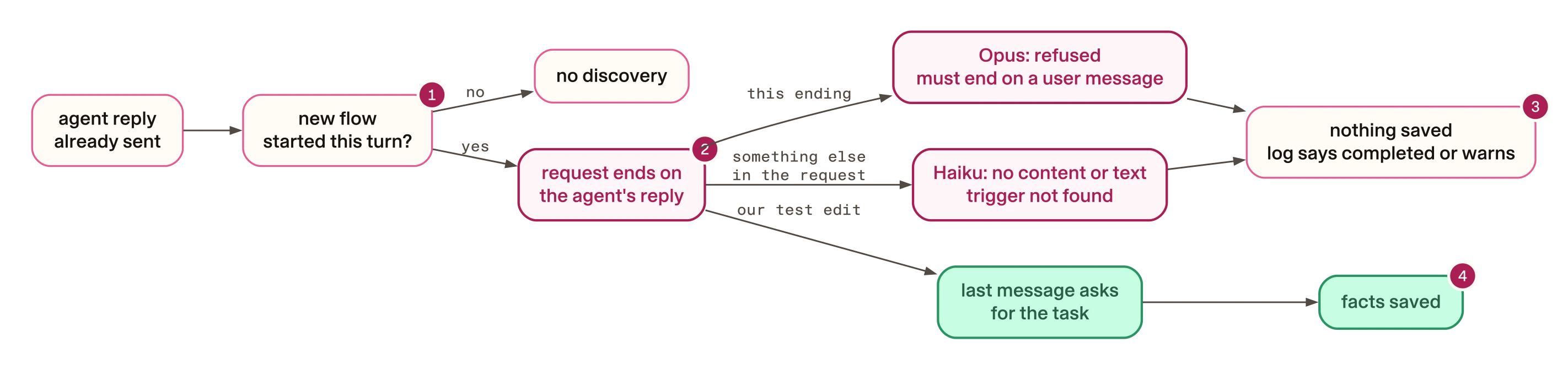
- Discovery runs only after a clean turn that starts a new flow.
- The request ends on the reply the customer has already seen. Opus refuses that ending; Haiku answers without the save call for a reason we did not isolate.
- Every failure ends quietly: an INFO line that says completed, or a warning.
- When a final user message asked for the task, the facts were saved.
What made Claude save the facts
To find the cause, we took the exact request Rasa sent in the run above. We re-sent it straight to the Anthropic API, 20 times for each change. Rasa was not involved, and the temperature was 0. Each row changes one thing:
| What we changed in Rasa’s request | Haiku called the save tool |
|---|---|
| Nothing | 0 of 20 |
| Added a user message: “Please continue” | 0 of 20 |
| Added a user message: “Continue.” | 0 of 20 |
| Added a user message: “Record the facts now.” | 20 of 20, both facts |
Forced the tool with tool_choice | 20 of 20, both facts |
| Sent the instructions again as the final user message | 20 of 20, both facts |
The counts are totals computed from the per-call rows our replay scripts
recorded. Forcing the tool means setting the API’s tool_choice field so the
model must call that tool.
Anthropic’s page Handling stop reasons describes empty replies “particularly after tool results”. For empty replies that persist, it suggests a new user message, and its code example uses “Please continue”. On this request that wording did not help. A final user message only worked when it asked for the task.
Here is the first call of the two closest rows, as recorded:
Avoid: “Continue.” added
{"arm": "continue", "i": 1, "status": 200, "stop_reason": "end_turn", "block_types": ["text"], "tool_called": false, "facts": 0, "fact_keys": [], "text_head": "I don't have any additional information to share at the moment. What would you like to do next? I ca", "error": null}Text and no tool call. All 20 calls ended this way.
Prefer: “Record the facts now.” added
{"arm": "ask", "i": 1, "status": 200, "stop_reason": "tool_use", "block_types": ["tool_use"], "tool_called": true, "facts": 2, "fact_keys": ["customer_name", "communication_preference"], "text_head": "", "error": null}The tool call with both facts. All 20 calls ended this way.
Live runs agreed. We put a small proxy between Rasa and Anthropic that added “Record the facts now.” to this one request. With it, two Haiku runs and two Opus runs all saved the facts. With “Continue.” instead, two Haiku runs saved nothing.
This is not a general rule about message order. On Rasa’s request, removing both earlier tool calls from the history also brought the call back. Removing either one alone did not. We did not find out why.
These changes are tests, not a Rasa fix. Rasa’s own request adds no final user message and does not force the tool, and we did not patch Rasa. If you write a background call like this in your own code, end it on a user message that asks for the task, or force the tool. Then test it.
How to check that facts are saved
Do not check the reply. In the Haiku run at the top, the agent said “Got it” and nothing was saved. In the Opus run, the facts were saved and the agent said they were not. A reply cannot tell you what memory holds, in either direction. The conversation record can. Rasa calls this record the tracker. It lists every event in the conversation, including each memory write.
Train the agent and start it with its API on
In your project folder, run uv run rasa train --quiet first. Our runs used
the model that training wrote to the project’s models folder. Then run
uv run rasa run --enable-api. The API lets your test read the tracker.
Send a message that states a fact and starts a flow
Use the REST channel. Discovery runs only on a turn that starts a new flow, so pair the fact with a request your agent handles in a flow.
Wait for the background call
It runs after the reply. Our script uses a fixed 12-second wait; it does not poll for the memory write.
Read the tracker and check the memory write
Fetch /conversations/{sender}/tracker?include_events=ALL. Fail the test
unless the latest memory_set event for system.__discovered__ holds the
fact.
Our driver script did the rest of these steps against the quickstart, after our acceptance test had trained the agent. It starts the server, sends the messages, waits, and saves the tracker’s memory events to a JSON file.
Show the whole driver script (drive_discovery.py)
This is the script as we ran it, reformatted for reading with comments added.
The code itself is unchanged. To use it on your own agent, change
Path('examples/quickstart') to your project folder. If you use another
provider, change ANTHROPIC_API_KEY in the key check to the key your model
group names.
"""Drive one bounded conversation against the quickstart server. Secrets are never printed; output is scrubbed."""
import json, os, signal, socket, subprocess, sys, tempfile, time, uuid, urllib.request
from pathlib import Path
from dotenv import dotenv_values

project = Path('examples/quickstart').resolve()
out = Path(sys.argv[1])
messages = json.loads(sys.argv[2])

# Environment: .env.example defaults, then .env, then the shell environment.
defaults = {k: v for k, v in dotenv_values(project/'.env.example').items() if v}
env = {**defaults, **{k: v for k, v in dotenv_values('.env').items() if v}, **os.environ}
env.pop('LITELLM_MODIFY_PARAMS', None)
for key in ('RASA_LICENSE', 'ANTHROPIC_API_KEY'):
    if not env.get(key):
        raise SystemExit(f'{key} missing')
env.update({'LOG_LEVEL': 'INFO', 'RASA_LOG_LEVEL': 'INFO', 'RASA_TELEMETRY_ENABLED': 'false'})

secrets = [v for k, v in env.items()
           if any(w in k.upper() for w in ('KEY', 'TOKEN', 'LICENSE', 'SECRET', 'PASSWORD')) and len(v) > 8]

def scrub(t):
    for v in secrets:
        t = t.replace(v, '[REDACTED]')
    return t

# Start the server with its HTTP API on a free local port.
with socket.socket() as s:
    s.bind(('127.0.0.1', 0))
    port = s.getsockname()[1]
base = f'http://127.0.0.1:{port}'
log = tempfile.TemporaryFile(mode='w+')
server = subprocess.Popen(
    ['uv', 'run', 'rasa', 'run', '--enable-api', '--interface', '127.0.0.1', '--port', str(port)],
    cwd=project, env=env, stdout=log, stderr=log, start_new_session=True)

def req(path, data=None):
    r = urllib.request.Request(
        base+path,
        data=json.dumps(data).encode() if data is not None else None,
        headers={'Content-Type': 'application/json'})
    with urllib.request.urlopen(r, timeout=90) as x:
        return json.load(x)

res = {}
try:
    # Wait up to 120 seconds for the server to answer /status.
    dl = time.monotonic()+120
    while True:
        if server.poll() is not None:
            raise RuntimeError('server stopped')
        try:
            req('/status')
            break
        except Exception:
            if time.monotonic() > dl:
                raise RuntimeError('timeout')
            time.sleep(.5)

    # Send each customer message over the REST channel.
    sender = 'discovery-probe-' + uuid.uuid4().hex
    replies = []
    for m in messages:
        replies.append({'user': m, 'bot': [
            r.get('text') for r in req('/webhooks/rest/webhook', {'sender': sender, 'message': m})]})

    time.sleep(12)  # post-turn discovery runs after the reply; give it time

    # Read the tracker and keep its memory events.
    tracker = req(f'/conversations/{sender}/tracker?include_events=ALL')
    res = {'replies': replies, 'memory_events': [e for e in tracker['events'] if 'memory' in e.get('event', '')]}
finally:
    if server.poll() is None:
        os.killpg(server.pid, signal.SIGTERM)
        try:
            server.wait(timeout=15)
        except subprocess.TimeoutExpired:
            os.killpg(server.pid, signal.SIGKILL)
            server.wait()
    log.seek(0)
    out.write_text(scrub(log.read()))
    Path(str(out)+'.json').write_text(scrub(json.dumps(res, indent=1)))
print('done')
We ran it from the folder above the quickstart. The first argument is the log file to write. The second is the list of customer messages:
uv run --project examples/quickstart python drive_discovery.py run.log '["Hello", "Hi, my name is Priya Nair and I only want updates by text message, never email. How many monstera do you have?"]'It writes the scrubbed server log to run.log, and the replies and memory
events to run.log.json. It removes LITELLM_MODIFY_PARAMS from the
server’s environment, so the model library runs as the project ships it.
This check reads the JSON file the driver wrote. It passes only if a saved fact holds the value the customer stated:
"""Fail unless the tracker's latest discovered facts hold the value the customer stated."""
import json, sys

events = json.load(open(sys.argv[1]))["memory_events"]
expected = sys.argv[2].lower()
writes = [e for e in events
          if e.get("event") == "memory_set" and e.get("key") == "system.__discovered__"]
facts = writes[-1]["value"] if writes else []  # each write holds the full list
hits = [f["key"] for f in facts if expected in str(f.get("value", "")).lower()]
print(f"discovered facts: {len(facts)}; holding {sys.argv[2]!r}: {', '.join(hits) or 'none'}")
sys.exit(0 if hits else 1)
Save it as assert_discovered.py and run it on the driver’s output:
- Any system
python assert_discovered.py run.log.json 'Priya Nair'
What this check costs
The check is slower than a unit test. Every run makes live model calls and needs your Rasa licence and model key. It waits on a timer and tests one phrasing of one fact.
One pass is one sample, so run it more than once before you trust a green result. Run it again when you change the model or upgrade Rasa.
A green check that looks at the wrong thing is a trap. The same thing happened in a handoff check that read five out of five while the package omitted the disputed charge.
Limits
- We tested one Rasa release, two Claude models and Anthropic as the provider. We did not test OpenAI or any other provider.
- The live runs are a handful. The 20 repeated calls show that one request gave a stable answer, not how often this happens across conversations.
- The Opus refusal came from the acceptance conversation. We did not run the Priya Nair conversation on Opus without the proxy.
- Apart from the memory code that stores them, the only Rasa Python code that
reads these facts uses them to stop the model recording the same fact
twice. So the loss matters if your own code reads
system.__discovered__. We did not test that case.