

Guide · AI product engineer
Test a delivery agent's handoff after a refused change
Inspect saved tool calls and unfinished skills to check what your delivery assistant does after a tool refuses a request.
Key takeaways (3)
- Check the refused operation, the handoff result and the remaining task separately.
- Replay a saved conversation before paying to run it again.
- Check compilation and model choices with separate tests.
Your delivery assistant lets customers ask for a different delivery day. Some changes need staff review. When its tool refuses a change, you want the assistant to explain the decision and offer a handoff, without trying to make the same change through another tool.
In this exercise, you will compare two ways of referring to a handoff skill, inspect how Mantle compiles them, and check the tools used in a conversation. You will also learn to check whether a handoff leaves the refused task open. That matters when your service requires the assistant to end the task before it accepts another request. The recordings expose both the handoff acknowledgement and the remaining skill state. Those are different checks: in the recorded pair used here, both agents obtained a simulated handoff, but neither had closed the original task when the two-message trial stopped.
The example is deliberately small. Its delivery-change tool always refuses; its staff handoff returns a demonstration reference. It changes no delivery and contacts no member of staff.
Read the saved conversations first
You need Git and Python 3 for this part. You do not need a model key, licence, server or installed Rasa SDK. From a resources checkout, fetch the exact runnable example and create a separate source-only worktree:
git fetch origin e6415b9f81a199ee64c70ff8b63780a45ff7723c
git worktree add --detach ../rasa-refusal-handoff e6415b9f81a199ee64c70ff8b63780a45ff7723c
cd ../rasa-refusal-handoff/tutorials/refusal-handoff
python3 replay.py --variant bare --read receipts/recorded-pair-20261013/bare.json
python3 replay.py --variant referenced --read receipts/recorded-pair-20261013/referenced.json
Choose another worktree destination if that path already exists. Git copies
committed source; it copies no existing environment or credentials. Run the
remaining commands from tutorials/refusal-handoff in this new worktree.
Each reader command prints one JSON result. Both include "status": "passed"
and "task_closed": false. Keep both fields in view: they answer different
questions. If the reader reports a wrong or incomplete episode, check the
variant and file path rather than starting another model trial.
The files contain reduced copies of one two-message trial per variant, recorded on 13 October 2026. They retain the actual messages, replies, tool events and remaining skill entries used by the reader. Other tracker fields and non-tool events are omitted. The accompanying derivation receipt binds them to the originals. These are derived teaching files, not unedited provider responses.
If you only need the saved-data exercise, continue to the handoff and task-state checks. The next section explains the native skill-reference mechanism.
Make one change to the handoff instruction
The blocked-request skill first calls request_change. After refusal, it
offers the staff handoff and waits for agreement. It also names three tools
that must not be used as a detour: note_request, send_elsewhere and
retry_change.
To inspect the engine mechanism, install the SDK in this project. You need Python 3.12, uv and make. The lock pins Rasa Pro 3.21.0.dev5:
uv sync --prerelease=allow --locked --python 3.12Run the checks from the same project directory:
- Any system
make native-test
The recorded suite ran 23 checks and finished with OK. It exercises the
native compiler, activation classifier and tool invoker, plus saved-recording,
synthetic tracker and loopback-network controls. It does not ask a model to
choose a tool. These controls need neither a model key nor a Rasa licence.
If imports fail, check Python 3.12 and the locked project environment; do not
upgrade dependencies past the error.
You will use one environment for both variants. Preparation copies source and
configuration without copying .venv or credentials.
Prepare two new directories from the same project:
uv run --locked python experiment.py prepare --variant bare --run-dir /tmp/refusal-bare
uv run --locked python experiment.py prepare --variant referenced --run-dir /tmp/refusal-referenced
uv run --locked python experiment.py native --run-dir /tmp/refusal-bare
uv run --locked python experiment.py native --run-dir /tmp/refusal-referenced
The preparer refuses to overwrite an existing directory. Choose fresh names if these are occupied; do not remove a directory whose experiment you still need.
Successful preparation prints the variant, its skill-file checksum and the
statement that the original interpreter is reused, and writes variant.json
in each directory. The native commands print referenced_skills, warnings
and native_activation_mode; match those fields to the table below.
The instructional difference is staff_handoff versus
@skill.staff_handoff. The native results explain why the prefix matters:
| Check | Bare skill name | Explicit skill reference |
|---|---|---|
| Compiled referenced skills | Empty list | staff_handoff |
| Bare-name warning | Present | Absent |
| Activation classification | interrupt | regular |
The explicit reference lets the compiler identify the skill. In this pinned SDK, its activation is classified as delegation rather than a topic change. That describes how an activation is treated if it occurs. It does not make the model choose the handoff, obey the refusal rule or end the task. The classifier is an internal SDK method; rerun its controls when changing Rasa versions rather than carrying this table forward as a guarantee.
Inspect the handoff and the remaining task separately
Mantle records unfinished skills in its tracker stack. Each skill entry is a
frame. A handoff can return a result while a skill remains active or suspended.
The replay reader calls the skill entries at the end of the captured trial
terminal_frames: here, terminal means where the recording stopped, not that
the skills have finished. It computes task_closed by checking whether either
of this example’s two skills remains; it does not inspect a real staff queue.
The two-message trial asks to change the delivery day to Friday, then agrees to a staff handoff. The replay reader checks the tracker, rather than judging whether the assistant’s reply sounds reassuring. Its acceptance rules require an initial refusal, no later detour or retry, and exactly one simulated handoff after the customer’s agreement.
Inspect the referenced variant’s JSON again. This excerpt omits its engine control calls and scope label; the full output remains available from the reader command above:
{
  "status": "passed",
  "tool_order": ["request_change", "record_demo_handoff"],
  "terminal_frames": [
    { "skill_id": "blocked_request", "frame_type": "regular" }
  ],
  "task_closed": false
}
Look for status: passed, tool_order: ["request_change", "record_demo_handoff"] and task_closed: false. The first status belongs to
the tool-path check. The last field answers the separate closure question.
The retained pair has these outcomes:
| Recorded check | Bare skill name | Explicit skill reference |
|---|---|---|
| Business-tool order | request_change, record_demo_handoff | Same |
| Tool-path checks | Passed | Passed |
| Terminal task closed | No | No |
| Remaining skill frames | Blocked request and staff handoff | Blocked request |
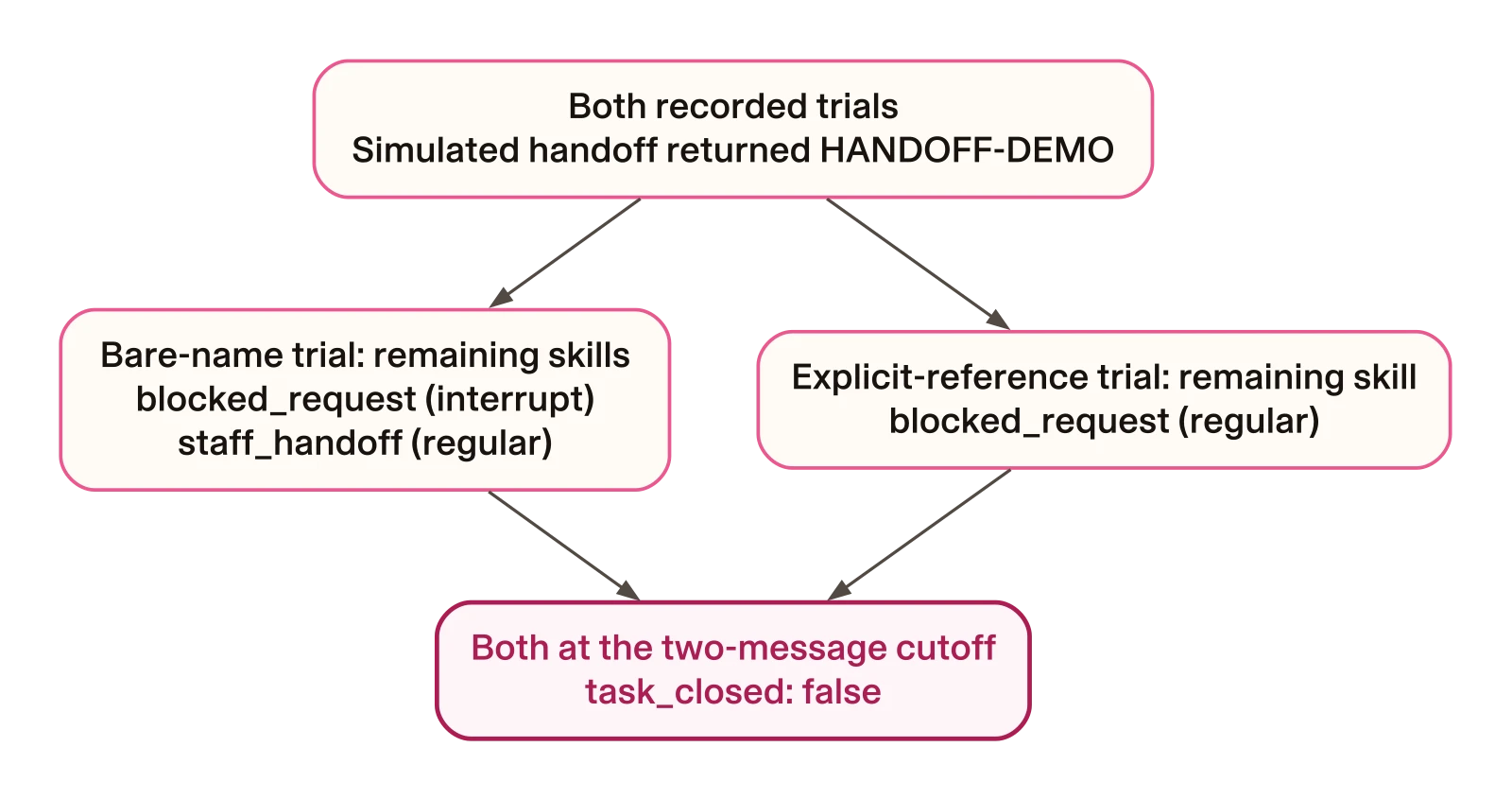
Read this as two captured states, rather than a prediction of the next turn. The remaining frames differ between these two trials; the original blocked request is present in both. A real staff-queue acknowledgement would be another observation outside this demonstration.
This single pair describes two observations. Estimating reliability or attributing a behavioural change to either instruction needs repeated, controlled trials. Its value is showing what your acceptance checks need to keep separate. A handoff tool can return its reference while an earlier task remains on the stack. Decide whether your application allows that state, then test the next turn if task closure is part of your requirement.
Separate the handoff result from the end state
The second answer matches the recording. Check the handoff result and the remaining task independently. A subsequent turn is needed to learn whether the assistant finishes or resumes that task; this recording contains no such turn. The demonstration reference also tells you nothing about a real staff queue. In your own integration, check the queue’s acknowledgement separately.
Run a selected conversation when you need fresh evidence
If you skipped the native section, first install the SDK and prepare the two variant directories using its commands. You can skip the classifier comparison.
This optional step needs your exported OPENAI_API_KEY and RASA_LICENSE in
the server terminal. The project’s blank .env.example lists the variables.
The model runs on the server; the replay client discovers no credentials.
The pinned configuration names gpt-5.5-2026-04-23 with low reasoning effort.
Check that your account can use that exact model before choosing the paid
path; a model-access error is not evidence that the refusal rule failed.
One message can produce several paid model calls. Reading a saved trace, by
contrast, makes none.
From the companion project directory, train the bare variant, then start its local server:
uv run --locked python experiment.py train --run-dir /tmp/refusal-bare
uv run --locked python experiment.py run --run-dir /tmp/refusal-bare --port 5051
Successful training prints CALM model package saved at followed by a new
archive under the prepared directory’s models/ folder. Its generated
filename will vary. Wait for Rasa server is up and running. before sending
the conversation from the second terminal. These markers appeared in the
retained training and server logs.
If training fails, inspect
the error, check the exported variables and confirm that preparation wrote
variant.json in the run directory. A new conversation is unnecessary for
diagnosing a training error.
In a second terminal, return to the same companion project directory:
python3 replay.py --variant bare --base-url http://127.0.0.1:5051 --out /tmp/refusal-bare-trace.jsonThe client only accepts a plain HTTP loopback origin. It ignores inherited proxy settings and rejects redirects. If it cannot connect, check that your server is ready at the specified port. If it receives a redirect, inspect the local address rather than forwarding the conversation elsewhere.
Check your server command and its prepared directory to establish which variant served the request; the client stores the label you supply. The client sends the same two messages for both variants and refuses to overwrite an existing trace. It makes no automatic retry after a failure.
Stop your own server with Ctrl-C. To try the referenced variant, train and
run /tmp/refusal-referenced, then repeat the replay command with
--variant referenced and a different output path. If port 5051 is occupied,
choose another port in both commands; do not stop another person’s server.
Keep both outcomes, including failures or matching behaviour.
Reuse a saved trace before running another trial
Once you have a trace from the companion’s replay command, you can check it without a running server or another model request:
python3 replay.py --variant bare --read /tmp/refusal-bare-trace.jsonKeep failed traces too. For example, a retry after the refusal produces
A detour or retry followed refusal. Inspect the saved tool events to locate
that call. The reader will reject a later retry, an unexpected
business tool, a missing refusal or an invalid handoff result. The companion
tests include deliberately bad histories and weakened checks so that the
reader itself is tested. Those synthetic controls establish the check’s
sensitivity; they do not show how often a model makes the corresponding
mistake.
Use the distinction in your own assistant
Replace the demonstration handoff with a real staff-queue integration, and check its actual acknowledgement. Remove capabilities the assistant does not need, instead of relying only on an instruction not to use them. Keep three questions in your tests: did the original tool refuse, did the assistant take an allowed exit, and did the task reach the terminal state your service needs?
After a selected live trial, stop its server and keep its unique traces. Retire an inactive managed environment with the resources repository’s workspace commands. Keep the manifests and lockfile so you can rebuild it.