Guide · Risk reviewer / domain owner
How to audit the documents an AI agent writes
List every way the model can change a document your agent writes, then test each one the way the agent calls it.
Key takeaways (3)
- A fluent document and a passing test suite do not show where each figure came from.
- List every way the model can change the document, then test each one the way the agent calls it.
- A refusal stops the next render, not the copy already saved, so check the file before it leaves.
Your agent writes documents that people keep: a client letter, a case summary, a suitability record. The tests pass, so you expect the agent to hear when an edit goes wrong. We checked that on a companion project built so that the model cannot type a figure into its document. Its test suite passes:
Ran 41 tests in 0.053s

OK
Then we called one of its tools the way the Rasa Pro 3.20.0rc1 runtime calls it. We have not rerun this on 3.21.0.dev5, the version the site now pins. The tool points the portfolio total at a different record. This is the output trimmed to the first call, with log timestamps removed:
== 1. point_field_at_record through the engine
total_value before: 486210.44
[error    ] mantle.skill_executor.tool_error error_type=TypeError tool=point_field_at_record
[debug    ] mantle.skill_executor.tool_error.debug error="object ToolResult can't be used in 'await' expression" tool=point_field_at_record
returned: {"error": "object ToolResult can't be used in 'await' expression"}
total_value after: 21804.1
revisions: 22
The runtime reported the call as failed, yet the total changed. The suite passes, and we still found five gaps.
The fix is to list every way the model can write to the document. Test each one the way the agent calls it, and check the saved file before it leaves. That matters if your documents go to clients or regulators. Check 1 below is that inventory. Checks 2 to 6 are the five gaps, each with how to test for it in your own agent.
What you need: the companion project
tutorials/rasa-document-artifact-tutorial
in RasaHQ/rasa-community-resources, Python, and rasa-pro installed for
the engine checks. No model, licence or network is needed. The versions we
used are under Limits.
Why a correct-looking document is not enough
Reading the output checks that a figure agrees with a record. It cannot show where the figure came from. In the tutorial’s illustrative example, the prose gives property funds as “about 12%”. The companion’s invented custodian extract has a property row at 11.9%, so a reviewer would tick it.
But the record the companion builds from the same data does not cite the property figure. Its Completeness section lists the property fields as blank:
## Completeness

3 declared field(s) have no source and render blank:

- `property_value`
- `property_weight`
- `include_property_breakdown`
The companion project is built so the model cannot write a figure. The conversation edits a structured state, never the document. The renderer rebuilds the whole document from that state each time it runs. Most fields are sourced: the model names a record, and the record supplies the value. Two fields are negotiated: the model picks a value from a short fixed list, such as who the record is addressed to.
A sourced field is set with the tool below. This excerpt is its signature
and docstring from the companion’s tools/document.py; the body follows in
the file. There is no parameter for a value:
def point_field_at_record(
    field_key: str,
    source_id: str,
    record_id: str,
    record_field: str,
    reason: str,
    context: Any = None,
) -> ToolResult:
    """Re-point a sourced field. Note the absent `value` parameter."""
Check 1: list every way the model can write to the document
The model can only fill in the parameters that the agent runtime offers it. So start from the tool schemas the runtime builds, not from the tool descriptions. In Rasa Pro 3.20.0rc1, the runtime builds each schema from the function’s signature and allows no extra properties.
This is the script we ran. We saved it as print_tool_schemas.py in the
companion’s project folder and ran it with Python, with Rasa Pro installed.
It asks Rasa for the schema of each document tool and prints the parameters:
"""Offline proof: the schema Rasa Pro builds for each companion tool. No model, no network."""
import json, sys
from pathlib import Path
sys.path.insert(0, str(Path(__file__).resolve().parent))
from rasa.mantle.llm.tool_schemas import agent_tool_schema_from_custom_tool
import tools.document as td

for name in ("point_field_at_record", "choose_option", "clear_document_field", "render_document"):
    schema = agent_tool_schema_from_custom_tool(name, getattr(td, name))
    p = schema.parameters
    print(f"{name}: properties={list(p['properties'])} required={p['required']} additionalProperties={p['additionalProperties']}")
Its output:
point_field_at_record: properties=['field_key', 'source_id', 'record_id', 'record_field', 'reason'] required=['field_key', 'source_id', 'record_id', 'record_field', 'reason'] additionalProperties=False
choose_option: properties=['field_key', 'option', 'reason'] required=['field_key', 'option', 'reason'] additionalProperties=False
clear_document_field: properties=['field_key', 'reason'] required=['field_key', 'reason'] additionalProperties=False
render_document: properties=[] required=[] additionalProperties=False
In your own project, change the tool module and the list of names to your document tools.
Before reading on: from those four schemas, list every way the model can change what the document says
There are four, and your sign-off should name all of them.
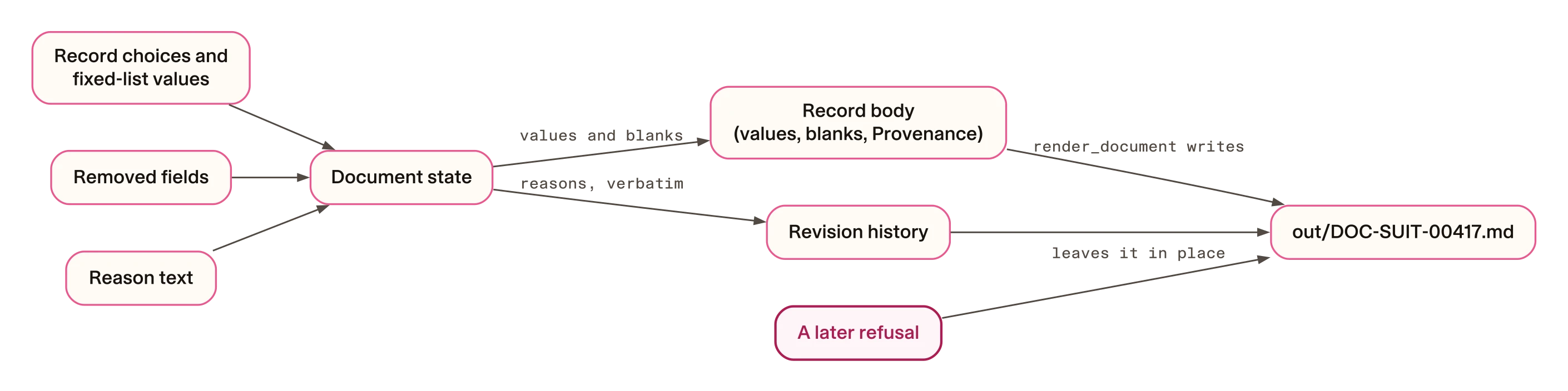
- Which record a sourced field cites, through
point_field_at_record. The model cannot type a figure, but it can cite the wrong record. - A value from a fixed list, through
choose_option, for the two negotiated fields. - Removing any field, through
clear_document_field, which takes anyfield_key. - Free text, through
reason. Every write tool requires it, and the renderer prints it into the record’s revision history.
The fourth is easy to miss, because nothing in the schema says where a reason ends up.
The diagram shows where each input lands, including the file that the render tool leaves behind:
Check 2: test refusals the way the agent calls the tools
One of the 41 tests asks exactly what a reviewer would ask: does a refusal
reach the agent? Its docstring says it tests “The path the AGENT runs”. But
it calls the tool as a plain Python function. This excerpt is the test
method from tests/test_derived_document.py:
    def test_the_refusal_reaches_the_agent_tool_as_a_refusal_not_a_crash(self):
        """The path the AGENT runs, not just the function underneath it."""
        import tools.document as td

        td._reset_for_tests()
        self._restate(total_value_gbp=911000.00)
        result = td.render_document().llm_response
        self.assertFalse(result["ok"])
        self.assertEqual(result["refused"], "provenance_broken")
        self.assertIn("total_value", result["fields"])
        td._reset_for_tests()
The agent does not call the tool that way. This one-line excerpt is how the
tool invoker in Rasa Pro 3.20.0rc1 runs a local tool, from
rasa/mantle/orchestration/tool_execution/invoker.py, at its source
indentation:
return await func(context=ctx, **tool_args), NoneIn Rasa Pro 3.20.0rc1, the tool() decorator is documented as “Mark an async
function as an LLM-callable tool”. The companion’s tools are plain def
functions. With such a tool, that runtime accepted it, ran it to the end and
then returned a generic error as the tool’s result. That is the run at the top of
this page. The render tool behaved the same way. It wrote the document file and
returned the same error. After the extract was restated, it returned that
error again, with no refusal code and no field name.
Show the script behind the engine run
We saved this script as engine_call_path.py in the companion’s project
folder and ran it with Python and Rasa Pro 3.20.0rc1 installed. It calls the
tools through the runtime’s ToolInvoker.call_tool_func, with a stand-in
session that does nothing. It uses that version’s internal API, so check the
names on yours. It has side effects, so run it in a throwaway copy of the
companion. It rewrites data/source/holdings.json for the restated total,
and its finally block restores the file. It also deletes any existing
out/DOC-SUIT-00417.md and writes a new one. One comment in the script
calls that file “the committed copy”; the companion does not commit it, so
read it as any existing copy. The script is shown as we ran it:
"""Offline proof: the companion tools called through Rasa Pro's ToolInvoker.call_tool_func.

No model, no network, no licence. A stand-in session supplies the two members
call_tool_func touches (memory_scope, recording_write); everything else is the
engine's own code.
"""
import asyncio, contextlib, json, sys
from pathlib import Path
ROOT = Path(__file__).resolve().parent
sys.path.insert(0, str(ROOT))
import rasa.mantle.orchestration.tool_execution.invoker as inv
import tools.document as td
from docpkg.sources import SOURCES

class StandInSession:
    def memory_scope(self):
        return ("assemble_record", "assemble_record")
    @contextlib.contextmanager
    def recording_write(self, tool, arguments):
        yield

invoker = inv.ToolInvoker(mcp_runtime=None, tool_timeout=10, verbatim_trigger_evaluator=None)

async def call(func, name, **args):
    return await invoker.call_tool_func(func, name, args, StandInSession(), ("assemble_record", "assemble_record"))

async def main():
    extract = SOURCES["custodian-extract"].path
    original = extract.read_text()
    out_file = ROOT / "out" / "DOC-SUIT-00417.md"
    try:
        print("== 1. point_field_at_record through the engine")
        td._reset_for_tests()
        print("total_value before:", td.STATE.get("total_value").value)
        print("returned:", await call(td.point_field_at_record, "point_field_at_record",
              field_key="total_value", source_id="custodian-extract",
              record_id="VAL-2026-08-29-PF4402", record_field="cash_gbp",
              reason="adviser asked to show the cash line instead"))
        print("total_value after:", td.STATE.get("total_value").value)
        print("revisions:", len(td.STATE.revisions))

        print("\n== 2. render_document through the engine, fixture state")
        td._reset_for_tests()
        out_file.unlink(missing_ok=True)  # the committed copy is removed so the write is visible
        print("out file exists before:", out_file.exists())
        print("returned:", await call(td.render_document, "render_document"))
        print("out file exists after:", out_file.exists())
        print("out file total line:", [l for l in out_file.read_text().splitlines() if l.startswith("| Total portfolio value")][0])

        print("\n== 3. restate the extract, render_document again")
        payload = json.loads(original)
        payload["valuations"][0]["total_value_gbp"] = 911000.00
        extract.write_text(json.dumps(payload, indent=2))
        print("direct call:", td.render_document().llm_response["refused"])
        print("returned through engine:", await call(td.render_document, "render_document"))
        print("out file still exists:", out_file.exists())
        print("out file total line:", [l for l in out_file.read_text().splitlines() if l.startswith("| Total portfolio value")][0])
    finally:
        extract.write_text(original)
        td._reset_for_tests()

asyncio.run(main())
The change we tested is to declare the tool as async def. This is the
change to the render tool in tools/document.py:
-def render_document(context: Any = None) -> ToolResult:
+async def render_document(context: Any = None) -> ToolResult:
In a separate copy, we made that change to point_field_at_record and
render_document. Then we ran only render_document through the invoker,
with the extract restated. It returned the real refusal. The output is
trimmed here:
{"ok": false, "refused": "provenance_broken", ... "fields": ["total_value"]}That is one tool checked. We did not rerun the 41-test suite after the change, or check the other tools or a live conversation. In your own runtime, check what happens when a tool changes state and then fails. Call it through the runtime’s tool invoker at the version you deploy. Then compare what the model receives with what actually changed.
Check 3: break what a test checks and see if the outcome changes
The suite has a test named for the field boundary. It asserts that no
sourced field has the companion’s llm_settable flag set to true. We set the flag to true on total_value and called
the function the flag would open:
== A. flip llm_settable to True on the sourced field total_value
sourced fields now llm_settable: ['total_value']
set_negotiated_field('total_value') refused: free_text_into_sourced_field
The condition the test checks is now broken, yet the tool still refuses. In
docpkg/edits.py, the flag is read in the same condition as the field’s
kind: if spec.kind != "negotiated" or not spec.llm_settable:. A sourced
field fails the kind check whatever the flag says. So for a sourced field,
the test checks a flag that never decides the outcome. For the two negotiated
fields, the flag does decide.
What stops the model writing a figure is the shape of the tools, which the test file’s signature tests check.
For each test in your own project, break the condition it checks and see whether the outcome changes. If the outcome stays the same, the test is not guarding that outcome. We did this for the flag only; we did not remove the kind check and rerun. The mutation testing guide covers breaking a guard on purpose to test its tests.
Check 4: keep model text out of the record
Every write tool requires a reason, and the reason is free text. The
renderer prints it into the revision history as it arrived. Body values have
their pipe characters escaped, but reasons do not. We passed a reason that
reads like advice, calling docpkg.set_sourced_field directly:
== B. a reason is free text, rendered verbatim
| 22 | risk_profile | Balanced | Balanced | Client confirmed the portfolio remains well suited to her needs | no further review |
That row now carries a suitability statement. None of the fixture’s three sources contains that judgement or the word “suited”. The pipe has also given the row an extra column.
In your own renderer, pick one of three fixes. Keep reasons out of the document the client keeps, choose them from a fixed list, or label them as the model’s words.
Check 5: lock down removal and re-citation of regulated fields
The regulated sections, Charges and Disclosures, refuse values typed in the
conversation. Removal and re-citation are another matter. The clear_field
function checks only that the field exists and that a reason was given. The
set_sourced_field function does not check which section a field belongs
to. The model reaches them through clear_document_field and
point_field_at_record. We tried both on the risk warning, calling
docpkg.clear_field and docpkg.set_sourced_field directly, not through the
agent tools:
Clear the risk warning
== C. clear the regulated risk warning
| Risk warning | — |
4 declared field(s) have no source and render blank:

- `property_value`
- `property_weight`
- `risk_warning` **(required)**
- `include_property_breakdown`
The document still renders. The Completeness section flags the warning as required, but nothing stops the record being produced without it.
Point it at another record
accepted; cited as: Custodian position extract · POS-PF4402-003 · asset_class
| Risk warning | Property funds |
We pointed the risk warning at the asset class of the property holding. The edit was accepted and the record rendered.
The disclosure now reads “Property funds”, with a valid citation, so the renderer has nothing to refuse. In your own code, decide which fields the model may remove or re-point, and whether a blank required field stops the document. Check those answers with your compliance team.
Check 6: check the saved copy before it leaves
The renderer refuses when a cited figure no longer matches its record. But
render_document also writes the document to out/DOC-SUIT-00417.md on
every successful render, and a later refusal leaves that file alone. This is
the end of the engine run, trimmed to the refusal and file lines:
== 3. restate the extract, render_document again
direct call: provenance_broken
out file still exists: True
out file total line: | Total portfolio value | £486,210.44 |In your own pipeline, find out which copy leaves the building and what checks it at that moment.
How to run these checks on your own agent
Run all six offline, against your own document tools and renderer. Each row says what we saw in the companion and how to test for it:
| Check | What we saw in the companion | How to test your own agent |
|---|---|---|
| 1. List the write paths | Four model inputs reach the document, one of them free text | Print each tool’s schema with the runtime’s own builder |
| 2. Test through the runtime | The edit ran, and the agent got a generic error | Call each write tool through the invoker you deploy |
| 3. Break what a test checks | For a sourced field, the boundary test checks a flag that never decides | Break the condition a test checks; the outcome should change |
| 4. Keep model text out | A reason was printed as typed, pipe and all | Pass advice-like text with a pipe; look for it in the output |
| 5. Lock regulated fields | The risk warning was cleared or re-pointed and still rendered | Clear and re-point each regulated field, then render |
| 6. Recheck the saved copy | The old file kept the old total after a refusal | Restate a source after a render, then read the saved file |
What still needs a person
Fixing all five gaps still leaves questions that no code settles.
The right record. A figure can be traced and still be the wrong one. The
companion’s scripts/render_document.py --diff points the total at the cash
line of the same valuation. The document renders without complaint, because
the new citation is valid. This is the start of its output:
One field changed:
  field  : total_value
  before : 486210.44
  after  : 21804.1
  cited  : Custodian position extract · VAL-2026-08-29-PF4402 · cash_gbp
Someone who knows the client’s holdings still has to read the Provenance section.
Whether the record is true. The renderer checks that a figure agrees with its record. A wrong extract produces a correctly cited wrong figure.
Where the state lives. In the companion, the document state lives in memory for one process. Our checks say nothing about your document service, so run them against it.
The legal question. This page makes no claim that the field declarations or the history meet any record-keeping or audit requirement. That decision belongs to your compliance team.
Record each gap and each open question against the “Export a document” line of your action register. The permission review guide sets out that register. Anything still open at launch is a risk that your release decision should name, with an owner.
Limits
- The scenario, client and figures are synthetic, built for the tutorial.
- Every check is an offline script, an offline test or a reading of the code. None shows what a model would choose to do in a conversation. Each shows a path the code leaves open.
- Every check ran on the companion at commit
69e27b6. The engine checks used Rasa Pro 3.20.0rc1 under Python 3.12. - The pinned commit,
4aa0c44, changes only the project’s README, lock file, API key setting and Rasa pin, now 3.21.0.dev5. We have not rerun the engine checks on 3.21.0.dev5. - The
async defchange was checked on one tool only. - Nothing here claims that the design meets any regulator’s suitability, record-keeping or disclosure rules. Which fields your documents need is a decision for your team.