

Guide · AI product engineer
How to Make a Voice Agent on SilverLake Confirm Transfers
Build a voice banking agent on a Jack Henry SilverLake mock, require exact confirmation before a transfer, and delete each check to see which tests notice.
Key takeaways (3)
- Require the caller's exact next reply before sending a transfer.
- Remove one check at a time to find which ones your tests do not pin.
- Use a seeded banking mock to read balances, loans, and transfer reviews.
A voice assistant has read back a transfer, and the caller’s reply does not confirm it. This is from a recorded run, typed in the Inspector, at seed 295185:
Assistant: Review: transfer USD 25.00 from checking-A to savings-A. To submit exactly this transfer, say confirm transfer next. Anything else cancels this review.
You: Yes.
Assistant: The transfer review was canceled or is no longer active. Request a new transfer before confirming.
Nothing was sent. A plain “yes” is not the confirmation, and step 7 shows why that is the safe design.
Here is what this tutorial found by deleting code. The exact-words rule, “confirm transfer”, is written twice in the example. We deleted each copy, deleted both, and loosened the match so that “yes” confirms. The example’s own 150 tests still passed every time. Only the next-turn rule was pinned. With two tests added, 9 of the 10 removals we tried fail a test. The tenth removes the words check from _host only, and the submit tool still has its own copy of that check. Step 9 shows the code and the experiment.
| What we changed | Tests that fail, original 150 | Tests that fail, 152 with two added |
|---|---|---|
| Loosen the match so it accepts “yes” | 0 | 2 |
| Delete the exact-words check in both places | 0 | 2 |
| Delete the next-turn check in both places | 2 | 3 |
This is an offline check of the example’s code. No model, speech service, or bank took part, and the reply-policy layer was not changed.
You have been asked to put an assistant in front of a bank’s core system. Callers should be able to ask for a balance, check a loan, and move money between their own accounts. The risky part is the last one: this example is built so that it cannot send a transfer the caller did not confirm.
In this tutorial you build that assistant against a small simulated bank. It is not Jack Henry’s software and not a copy of the SilverLake core banking system. It is a mock written for this example: it answers only the six jXchange operations the assistant uses, and every message it sends or receives is checked against Jack Henry’s published schemas. Nothing talks to a real bank. All people, accounts, and amounts are fictional.
You start the assistant, ask it about money you can only read, and then move USD 25 between two accounts. One rule guards that transfer: the host shows you a review, and only the exact words “confirm transfer” on your very next turn send it. Anything else cancels the review.
Not claimed: Trained agent, model, voice, vendor, or current global release acceptance.
What you will learn
- Which lines of code stop a wrong confirmation, and how to find out whether your tests would notice if one were deleted: delete each check in turn and count the failing tests.
- What a tool is: one action the language model may ask for, such as “read a balance”. This example gives the model seven tools on its Model Context Protocol (MCP) server, plus two Rasa-side tools: one to ask for verification and one to ask for a transfer to be sent. Asking is all the model can do. The host decides.
- Which sentences come word for word from the example’s own code, and which ones the model writes from a tool’s result.
- How “review once, then confirm on the very next turn” keeps the example from sending a transfer the caller did not confirm.
- Why “accepted” does not mean “posted”, and why a missing payoff quote stays missing instead of being calculated.
- How a printed demo data seed lets you start again from the same fictional data. It repeats the data, not the model’s exact wording.
What you need
- Three keys: the keys page explains how to get each one: a free Rasa Developer Edition license (
RASA_LICENSE), an OpenAI API key (OPENAI_API_KEY), and a Deepgram API key (DEEPGRAM_API_KEY). OpenAI and Deepgram usage may cost money, so check both accounts first. - A GitHub account with Codespaces: this example runs only in GitHub Codespaces, a development environment in your browser. Running it on your own computer is not tested or supported.
- No Jack Henry account: in step 3 you download Jack Henry’s public API definitions. No sign-in is needed.
- A microphone is optional: you type every step in this tutorial, and the README says a typed check does not verify speech.
You should know a little Python and Git. You do not need to know Rasa, MCP, or SOAP. Each term is explained when it first appears.
The code is in the examples/jack-henry-silverlake/ folder of RasaHQ/rasa-community-resources.
The example in this tutorial was run at commit 84a145aae7360e7d8d8b4d6db6ec05ca7bee6104 of that repository. The Codespaces link below opens that revision. The model’s wording may still differ from the recorded replies. The amounts, the seed, and the sentences the host writes do not depend on the model.
Step 1. Save the three keys as Codespaces secrets
A Codespaces secret stores a sensitive value outside the code. GitHub gives it to the running program as an environment variable: a named setting the program can read.
- Open your personal Codespaces settings.
- Under Secrets, click New secret.
- Enter
RASA_LICENSEas the name. - Paste only the value. Do not add
RASA_LICENSE=or quotes. - Under Repository access, select
RasaHQ/rasa-community-resources. - Save the secret.
- Repeat for
OPENAI_API_KEYandDEEPGRAM_API_KEY.
These are Codespaces secrets, not GitHub Actions secrets. Never put a key in a source file, a commit, or a chat message.
Checkpoint: all three names appear in your Codespaces secrets list. GitHub hides the values. That is expected.
If you change a secret after you create a Codespace, stop and restart the Codespace so it picks up the new value.
Step 2. Open the example in a Codespace
- Open this example in GitHub Codespaces. This link selects the recorded revision and this example’s setup.
- On the Create codespace page, click Create codespace.
- Wait for the editor to open and the setup to finish.
The terminal is the panel where you type commands. It opens in the example’s folder, so you do not need to change directories.
Checkpoint: the setup log ends with READY. The environment is ready. The assistant is not running yet.
Step 3. Download and check the bank’s API definitions
This example reaches SilverLake through jXchange, the banking interface it uses. jXchange uses SOAP (simple object access protocol) to exchange messages written in XML (extensible markup language). Jack Henry publishes a schema for each message. A schema describes the allowed structure of an API message: which fields it can contain and what types of values they accept.
In the terminal, run:
make downloadmake runs a task the project defines. This one fetches Jack Henry’s public schema archive into vendor-inputs/. It then compares the file’s hash, a fingerprint of its contents, with the one the example was tested with.
Checkpoint: the terminal prints:
Saved and checked: vendor-inputs/TPG_R2026.1.00_XSD.zipIf the file does not match, you see this instead, and nothing is kept:
The download does not match the expected file. Nothing was saved.Do not swap in another archive to get past this. The example checks every message against these exact files. A different file means you are no longer testing what the example was tested with.
In the recorded run:
$ make download
Saved and checked: vendor-inputs/TPG_R2026.1.00_XSD.zip
Step 4. Start the assistant and note the seed
Run:
make runLeave this terminal running. It keeps printing while the server runs.
The example starts with fictional balances, loan amounts, and transactions. Each start draws new ones from a number called the seed. make first echoes the command it runs. The next line, the first one the example itself prints, gives the seed:
Demo data seed: <n>; set DEMO_SEED=<n> to get the same data again.Write that number down. Starting again with the same seed gives you the same starting data.
Checkpoint: look for these lines, in this order.
-
The seed line above.
-
This line, which means the downloaded definitions were found and checked:
Vendor definitions: found and checked. Mode: local SOAP mock checked against them. -
A line starting
Open the Inspector:, followed by a link. -
Later,
Rasa server is up and running.
The link prints before the server is ready. Wait for the last line before you open it. If you see Not ready., the message names what is missing, for example a secret.
The recorded run printed these lines. It drew the seed 765926. (... marks lines left out.)
uv run --locked python run_demo.py --port 5005
Demo data seed: 765926; set DEMO_SEED=765926 to get the same data again.
...
Vendor definitions: found and checked. Mode: local SOAP mock checked against them.
This mock uses fictional data only. It proves the conversation, not SilverLake compatibility.
Identity: one private teaching host, a fixed simulated caller; not real bank sign-in.
Use only fictional speech. The speech provider receives audio; opt-out is not zero retention.
Open the Inspector: ...
To stop, press Ctrl+C in this terminal.
...
2026-11-16 05:18:36 INFO     root  - Rasa server is up and running.
Your seed and your link may differ.
The tutorial’s numbers come from one recorded run, with seed 295185. Unless you set DEMO_SEED=295185, the example picks its own seed, so your amounts are not guaranteed to match. To get the same starting data, stop the server with Ctrl+C and start it with that seed:
DEMO_SEED=295185 make runThe example’s own test for this claim is test_same_seed_same_data. It generates the data twice from the same seed and checks that the two results are equal. Run only this test:
uv run --locked --group models python -m unittest discover -s tests -v -k test_same_seed_same_dataCheckpoint: the output is:
test_same_seed_same_data (test_demo_data.Reproducible.test_same_seed_same_data) ... ok

Ran 1 test in 0.000s

OK
That output is from a separate run of this one test at the same commit, saved in the single-test runs. This test is offline. It covers the starting data only, not the model’s wording.
The seed line now shows the seed you set:
uv run --locked python run_demo.py --port 5005
Demo data seed: 295185; set DEMO_SEED=295185 to get the same data again.
...
Vendor definitions: found and checked. Mode: local SOAP mock checked against them.
The Inspector is the browser page where you try the assistant. To open it, hold Ctrl (or Command on a Mac) and click the link. If that does not work, open the editor’s Ports tab, find port 5005, and click its globe icon. A port is a numbered endpoint for a running service.
In the Inspector, click Type your message to type instead of speaking.
Step 5. Meet the tools before you talk to them
The model decides what to do with each message. It cannot reach the bank directly. It can only ask for one of the tools the example offers. Those tools are served over the Model Context Protocol (MCP), the interface this example uses to expose tools to the assistant.
Open silverlake_demo/server.py. Each tool has a one-line description:
| Tool | Its description in the code |
|---|---|
banking_accounts | List the caller’s permitted fictional account aliases. |
banking_balance | Read the supplied available balance of one permitted deposit alias. |
banking_history | Read one returned page of posted transactions (at most three). |
banking_loan_payment | Read the current payment due and the next due date of one permitted loan alias. |
banking_payoff | Read a payoff quote for one date (YYYY-MM-DD) only if the bank supplies it. |
banking_review_transfer | Prepare exact own-account transfer details. This never sends anything. |
banking_transfer_status | Read the latest retained local transfer outcome. Never resends. |
Two of these matter most. The review tool never sends anything. The status tool never sends again. None of these seven sends a transfer.
The model also has two Rasa-side tools that are not on the MCP server:
| Tool | Description |
|---|---|
banking_refresh_verification | ALWAYS call this, and nothing else, when the caller says verify me or verify my identity. Refreshes simulated verification and delivers the confirmation sentence. |
banking_submit_transfer | Submit only after the next raw user turn says exactly confirm transfer. |
So the model can ask for a transfer to be sent. Asking is not sending. Neither tool has any authority of its own: the host checks every request first. In this example the host is the code between the model and the bank. It refreshes verification when your raw message says “verify me” or “verify my identity”. It sends a transfer only after its own review and your exact “confirm transfer” on the very next turn. It also records what happened to each transfer.
Prove the list for yourself. Open a second terminal from the editor’s Terminal menu, so the server keeps running in the first. Then run:
make testCheckpoint: these two tests pass:
test_the_mcp_server_registers_exactly_the_seven_curated_toolstest_confirm_submit_and_identity_are_not_mcp_tools
Look at the summary at the end. Expect no skipped tests. make test also installs the extra tool set that rebuilds the models from the bank’s files, so that test runs too. If the summary shows a skip, the archive is missing, so go back to step 3.
In the recorded run, both tests passed, the model test passed too, and the summary showed no skips:
test_confirm_submit_and_identity_are_not_mcp_tools (test_tool_surface.ToolSurface.test_confirm_submit_and_identity_are_not_mcp_tools) ... ok
test_the_mcp_server_registers_exactly_the_seven_curated_tools (test_tool_surface.ToolSurface.test_the_mcp_server_registers_exactly_the_seven_curated_tools) ... ok
...
test_the_committed_models_match_a_fresh_generation_from_the_pinned_archive (test_vendor_models.Regeneration.test_the_committed_models_match_a_fresh_generation_from_the_pinned_archive) ... ok
...
----------------------------------------------------------------------
Ran 150 tests in 85.183s

OK
The test that pins the tool list also checks that the server refuses a call carrying an argument the tool does not declare. The test is in tests/test_ci_vendor_free.py (lines 98 to 105):
    def test_discovery_is_exactly_seven_tools_and_extra_arguments_are_refused(self):
        credential = self.credential()
        tools = self.rpc(credential, "tools/list", {}).json()["result"]["tools"]
        self.assertEqual({tool["name"] for tool in tools}, set(TOOLS))
        self.assertEqual(len(tools), 7)
        reply = self.rpc(credential, "tools/call", {"name": "banking_balance",
                                                    "arguments": {"account": "checking-A", "verified": True}})
        self.assertEqual(reply.json()["error"]["code"], -32602)
It asks the server for its tool list and expects exactly seven names. Then it calls banking_balance with an extra argument, verified, and expects the error code -32602. Run only this test:
uv run --locked --group models python -m unittest discover -s tests -v -k test_discovery_is_exactly_seven_tools_and_extra_arguments_are_refusedCheckpoint: the last lines of the output are:
Ran 1 test in 0.084s

OK
That output is from a separate run of this one test at the same commit, saved in the single-test runs. The same test passed inside the full make test run above.
The submit tool you just met is also where the second copy of the confirmation checks lives. The finding at the top of this tutorial is about those copies, and Step 9 deletes them one at a time.
Step 6. Ask about money you can only read
In the Inspector, type these one at a time. Wait for each reply.
- “What is my checking balance?”
- “What accounts do I have?”
- “What did I spend recently?”
- “What is my next loan payment?”
- “What is my loan payoff on November 20, 2026?”
- “What is my loan payoff on December 24, 2026?”
The model writes every one of these replies from a tool’s result. Its sentences can differ from run to run, even with the same seed. Check the facts, not the wording.
Checkpoint:
- The accounts are
checking-A,savings-A, andloan-A. - The loan answer gives two separate facts: the payment due and the next due date.
- November 20 has a payoff quote.
- December 24 has no quote, and the assistant says so. It does not calculate one.
- The amounts match your seed. The payoff quote dates stay the same with every seed.
A loan payment is one installment. A payoff quote is the amount that would settle the whole loan on one date. They answer different questions, which is why the assistant keeps them apart.
Here are the replies from the recorded run, with seed 295185. In that live run the turns were typed in the Inspector, as you will type them, and the model was gpt-4o-mini at temperature 0. Unless you set DEMO_SEED=295185, your amounts are not guaranteed to match.
You: What is my checking balance?
Assistant: Your available balance in checking is $786.09 USD.
You: What accounts do I have?
Assistant: You have the following accounts:
- Checking: checking-A
- Savings: savings-A
- Loan: loan-AYou: What did I spend recently?
Assistant: Here are your recent transactions in checking:
1. **Date:** 2026-10-28 | **Amount:** $13.96 USD | **Type:** Debit
2. **Date:** 2026-10-28 | **Amount:** $41.06 USD | **Type:** Debit
3. **Date:** 2026-10-26 | **Amount:** $23.68 USD | **Type:** Credit
Would you like to see more transactions?You: What is my next loan payment?
Assistant: Your current payment due is $214.38 USD. The next due date is December 1, 2026.You: What is my loan payoff on November 20, 2026?
Assistant: Your loan payoff amount on November 20, 2026, is $5,094.36 USD.You: What is my loan payoff on December 24, 2026?
Assistant: The loan payoff amount for December 24, 2026, is not available.Step 7. Review, then confirm, a transfer
Now move money. Type these three lines in order, with nothing in between:
- “Verify me.”
- “Move 25 dollars from checking to savings.”
- “Confirm transfer.”
This time the model does not write the important replies. The host sends each of them word for word.
After “Verify me.”:
Your simulated verification was refreshed. It lasts about a minute.Verification here is simulated. It is a demo shortcut, not a way to sign in a real bank customer.
After the transfer request, the host reads back the exact transfer. The amount and the accounts come from the review. The rest of the sentence is fixed:
Review: transfer <currency> <amount> from <source> to <destination>. To submit exactly this transfer, say confirm transfer next. Anything else cancels this review.After “Confirm transfer.”:
The transfer request was accepted. Accepted does not mean posted.“Accepted” means the bank mock acknowledged the request. It does not mean a real bank moved the money or updated its ledger.
The recorded run, with seed 295185:
You: Verify me.
Assistant: Your simulated verification was refreshed. It lasts about a minute.
You: Move 25 dollars from checking to savings.
Assistant: Review: transfer USD 25.00 from checking-A to savings-A. To submit exactly this transfer, say confirm transfer next. Anything else cancels this review.
You: Confirm transfer.
Assistant: The transfer request was accepted. Accepted does not mean posted.
Which words confirm
Only one reply sends the transfer: “confirm transfer”, on the very next turn. Letter case does not matter, and you may end it with ”.” or ”!”. The host checks your raw turn: the exact words you typed, not the model’s reading of them.
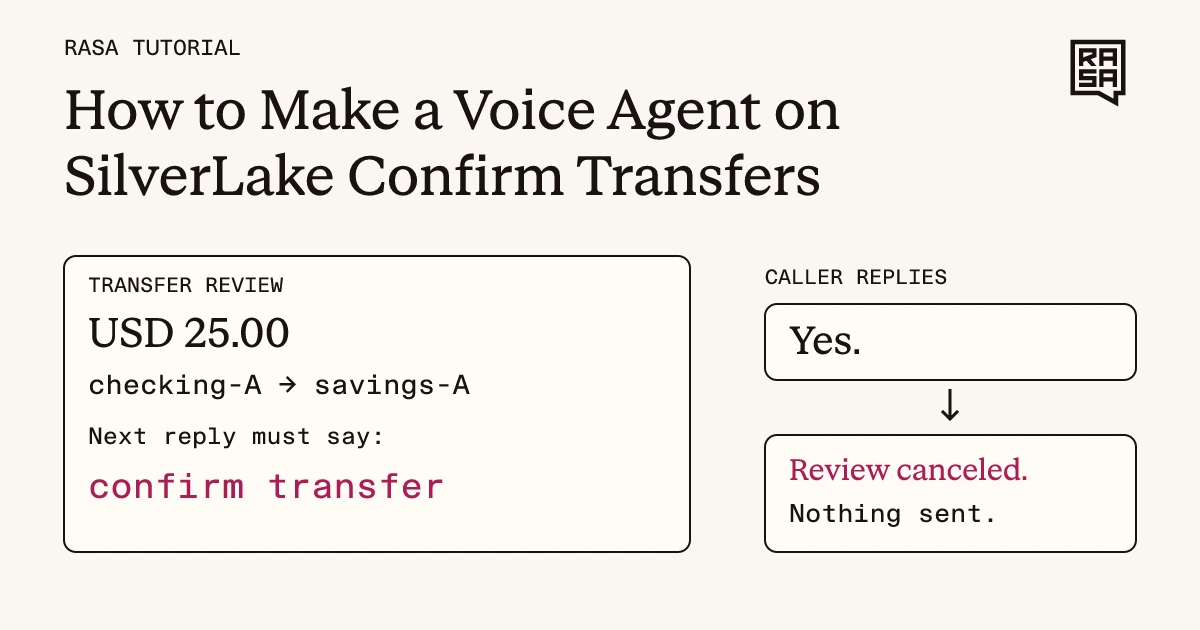
The fictional transfer stays unsent when the next reply is “Yes.”
Any other reply on that next turn cancels the review. That includes “yes”, “confirm”, and “confirmed”. The host recognizes these as attempts to confirm and answers them itself, but they do not send anything. Try it:
- “Verify me.”
- “Move 25 dollars from checking to savings.”
- “Yes.”
Checkpoint: after “Yes.”, when the assistant checks the transfer, the host replies:
The transfer review was canceled or is no longer active. Request a new transfer before confirming.Nothing was sent. To move the money, ask for a new transfer and reply “Confirm transfer.” straight after the review.
The recorded run, with seed 295185:
You: Verify me.
Assistant: Your simulated verification was refreshed. It lasts about a minute.
You: Move 25 dollars from checking to savings.
Assistant: Review: transfer USD 25.00 from checking-A to savings-A. To submit exactly this transfer, say confirm transfer next. Anything else cancels this review.
You: Yes.
Assistant: The transfer review was canceled or is no longer active. Request a new transfer before confirming.This exact-words rule is the one the opening says no test pinned: the host checks your raw turn, and that check is what Step 9 removes and loosens.
Step 8. Break the rule on purpose
A review is not permission that waits around. Test that an unrelated reply ends it. Type:
- “Verify me.”
- “Move 25 dollars from checking to savings.”
- “What is my checking balance?”
- “Confirm transfer.”
Checkpoint: the balance question canceled the review, so “Confirm transfer.” has nothing left to confirm. When the assistant checks the transfer, the host replies:
The transfer review was canceled or is no longer active. Request a new transfer before confirming.Nothing was sent. An old review can never be confirmed later. You must ask for a new one.
The recorded run, with seed 295185:
You: Verify me.
Assistant: Your simulated verification was refreshed. It lasts about a minute.
You: Move 25 dollars from checking to savings.
Assistant: Review: transfer USD 25.00 from checking-A to savings-A. To submit exactly this transfer, say confirm transfer next. Anything else cancels this review.
You: What is my checking balance?
Assistant: Your available balance in checking-A is USD 761.09.
You: Confirm transfer.
Assistant: The transfer review was canceled or is no longer active. Request a new transfer before confirming.
The balance is 25 lower than in step 6 because the mock applied the transfer accepted in step 7: accepted means the simulated bank acknowledged it, and this mock then lowers the available balance.
The balance tool, banking_balance, calls a helper named _host. In step 9 you will read _host: it cancels a waiting review when the current reply is not exactly confirm transfer. This is the offline test for that sequence, from tests/test_reply_adapter.py (lines 47 to 55):
    async def test_intervening_read_cancels_review_and_confirmation_requires_new_request(self):
        await self.review();self.turn("balance")
        await adapter.banking_balance("checking-A",context=self.context)
        self.turn("confirm transfer")
        result=await adapter.banking_submit_transfer(context=self.context)
        self.assertEqual(result.llm_response["state"],"refused")
        self.assertEqual(self.host.sends,0)
        self.assertIn("Request a new transfer",self.messages[-1])
        self.assertNotIn("confirm again",self.messages[-1])
It arms a review, types “balance”, reads the balance, types “confirm transfer”, and expects a refusal with nothing sent. Run only this test:
uv run --locked --group models python -m unittest discover -s tests -v -k test_intervening_read_cancels_review_and_confirmation_requires_new_requestCheckpoint: the output ends with:
test_intervening_read_cancels_review_and_confirmation_requires_new_request (test_reply_adapter.ReplyAdapterTests.test_intervening_read_cancels_review_and_confirmation_requires_new_request) ... ok

Ran 1 test in 0.007s

OK
That output is from a separate run of this one test at the same commit, saved in the single-test runs. The same test passed inside the full make test run.
A transfer can also be refused, or its outcome can be unknown when a reply from the bank is lost. This tutorial does not walk through those cases.
This is the next-turn rule, the one the opening says the tests do pin. Step 9 shows how it differs from the exact-words rule you tried in step 7.
Step 9. Find out which check stops “Yes.”
In steps 7 and 8, “Yes.” and an unrelated question both left the transfer unsent. This step asks which line of code did that, and whether your tests would notice if someone deleted it.
The guard, in the code
The example checks the caller’s words in two places in silverlake_demo/rasa_adapter.py. First, _is_confirmation (lines 42 and 43) matches only confirm transfer, with an optional . or !. Letter case does not matter:
def _is_confirmation(text):
    return re.fullmatch(r"confirm\s+transfer[.!]?", text.strip().casefold()) is not None
Second, _host (lines 117 to 123) cancels a waiting review unless the current turn is the very next one and passes that match:
    if conversation.pending and len(users) > conversation.pending_turn:
        # Only the immediately following exact phrase can confirm. A question,
        # denial, reset, changed request or intervening turn invalidates consent.
        if len(users) != conversation.pending_turn + 1 or not _is_confirmation(text):
            await asyncio.to_thread(conversation.client.cancel, conversation.session)
            conversation.pending = None
    return conversation
text in that code is the raw text of the caller’s current turn (line 97 of the same file), not the model’s reading of it. len(users) counts the caller’s turns, and conversation.pending_turn is the turn the review was made on. So the check asks two things: is this the very next turn, and are its words exactly confirm transfer?
_host is not a hook that runs on every turn. These tools call it: _read (line 180), which the six read tools use, plus banking_refresh_verification (line 222), banking_review_transfer (line 258), and banking_submit_transfer (line 326). When it runs, it counts all of the caller’s raw turns since its last run (lines 98 to 101), so a turn on which the model called no tool still counts. The test test_no_confirmation_is_accepted_after_an_interrupted_or_declined_review has exactly that kind of middle turn.
Third, banking_submit_transfer (lines 334 and 335) repeats both checks before it sends anything:
        turn = len(_users(context))
        if (not host.pending or context.is_cancelled or turn != host.pending_turn + 1
                or not _is_confirmation(native.turn.text)):
            if await _unresolved(host):
                await deliver_reply(context, UNKNOWN_OUTCOME_TEXT)
So there are two rules, the exact words and the very next turn, and each is written twice.
Remove one check at a time
We removed each check in turn and ran the whole suite. The script that does this, mutate.py, is in the receipt files. It writes each changed version of the file in turn, runs the suite, and puts the original file back when it finishes. The suite has 150 tests and all of them pass before any change. A count of 0 means no test noticed.
| What we removed | Tests that fail (150 tests) |
|---|---|
Drop the words check in _host only | 0 |
Drop the next-turn check in _host only | 1 |
Drop both checks in _host only | 1 |
| Drop the words check in the submit tool only | 0 |
| Drop the next-turn check in the submit tool only | 0 |
| Drop both checks in the submit tool only | 0 |
| Drop the words check in both places | 0 |
| Drop the next-turn check in both places | 2 |
| Drop both checks in both places | 3 |
| Loosen the match so it accepts “yes” | 0 |
The next-turn rule is pinned: remove it from both places and tests fail. The exact-words rule is not. Delete it from either place, delete it from both, or loosen it to accept “yes”, and every test still passes. Step 7 teaches that rule first, and nothing would have told you if it disappeared.
Dropping the words check in _host alone fails nothing even after the fix below. The submit tool carries its own copy of the same check, which is the likely reason.
Loosen the match so “yes” confirms
The last row of that table is this one-line change to _is_confirmation:
-    return re.fullmatch(r"confirm\s+transfer[.!]?", text.strip().casefold()) is not None
+    return re.fullmatch(r"(confirm\s+transfer|yes)[.!]?", text.strip().casefold()) is not None
Try it yourself. At the tutorial’s commit, make that change, run make test, and watch all 150 tests pass. Then undo the change.
Add the missing controls
We added two tests to tests/test_reply_adapter.py. In the same file, change the import line from unittest.mock import patch to from unittest.mock import AsyncMock, patch, then add this code after the first test in the class:
    async def _fresh_review(self):
        adapter._conversations.clear(); policy._delivered.clear(); policy._sent.clear()
        self.host = Host()
        self.conversation = adapter._Conversation("http://127.0.0.1:1", self.host, "session")
        adapter._conversations[("http://127.0.0.1:1", self.native.sender_id)] = self.conversation
        self.turn("review"); await self.review()

    async def test_any_reply_but_the_exact_words_straight_after_a_review_sends_nothing(self):
        # The phrase rule alone: each reply is the very next turn, so adjacency cannot be what stops it.
        for reply in ("Yes.", "yes", "Confirm.", "confirmed", "Please confirm transfer"):
            with self.subTest(reply=reply):
                await self._fresh_review()
                self.turn(reply)
                result = await adapter.banking_submit_transfer(context=self.context)
                self.assertNotEqual(result.llm_response["state"], "accepted")
                self.assertEqual(self.host.sends, 0)

    async def test_the_submit_tool_checks_the_words_and_the_turn_itself(self):
        # The submit tool's own check, with the host-side check that normally cancels first
        # replaced by a stand-in that hands back the armed review unchanged.
        for replies in (("Yes.",), ("What is my balance?", "Confirm transfer.")):
            with self.subTest(replies=replies):
                await self._fresh_review()
                for reply in replies:
                    self.turn(reply)
                with patch.object(adapter, "_host", new=AsyncMock(return_value=self.conversation)):
                    result = await adapter.banking_submit_transfer(context=self.context)
                self.assertNotEqual(result.llm_response["state"], "accepted")
                self.assertEqual(self.host.sends, 0)
The first test sends five wrong replies as the very next turn (“Yes.”, “yes”, “Confirm.”, “confirmed”, and “Please confirm transfer”) and checks that nothing is sent. The second replaces the host-side check with a stand-in, so only the submit tool’s own check stands between the reply and a send, and then tries a wrong phrase and a reply that is not the next turn.
With the loosened match in place, run make test again. Two tests now fail: test_any_reply_but_the_exact_words_straight_after_a_review_sends_nothing and test_the_submit_tool_checks_the_words_and_the_turn_itself. The full table, run on a copy that has both tests, is below.
| What we removed | Tests that fail (152 tests, with the two new tests) |
|---|---|
Drop the words check in _host only | 0 |
Drop the next-turn check in _host only | 1 |
Drop both checks in _host only | 1 |
| Drop the words check in the submit tool only | 1 |
| Drop the next-turn check in the submit tool only | 1 |
| Drop both checks in the submit tool only | 1 |
| Drop the words check in both places | 2 |
| Drop the next-turn check in both places | 3 |
| Drop both checks in both places | 5 |
| Loosen the match so it accepts “yes” | 2 |
Every removal except one now fails a test. The remaining zero is “Drop the words check in _host only”: the submit tool carries its own copy of the check (lines 334 and 335), which is the likely reason no added test fails for that removal. We did not test anything beyond these tests. The two added tests are in the example’s repository: pull request 254 added them, and it was merged after the commit this tutorial uses (pull request record). At this tutorial’s commit they are not in the example yet, so the second table was run on a copy that has them. The added tests as a patch are in the receipt files.
What this shows
This is an offline check of the example’s Python code. No model, speech service, or bank took part. It shows which changes the tests would notice. It does not show what a live conversation would do if a check were removed: the example has another layer, the reply policy, that also answers “yes” itself, and we did not remove it. That layer is lib/reply_policy.py (lines 211 to 213), which, when the model did not call the submit or status tool, replaces its reply with a call to the submit path for a bare “yes”, “confirm”, or “confirmed”. The results file lists the failing tests for every row.
The example also has a separate offline component proof, run on November 16, 2026 at this commit. Three test suites (tests.test_reply_adapter, tests.test_ci_vendor_free, and tests.test_demo_data) ran 51 tests in 6.158 seconds with no skips, on the locked Rasa 3.21.0.dev5 wheel. It is a different run from the 150 and 152 tests above and from the typed conversations. It exercises the confirmation and cancellation controls and the seeded replies with counted fake hosts and test fixtures, so it does not show a trained agent, a model, a voice call, a vendor, or a bank. The component proof receipt lists its eight decisive tests, the exact command, and these limits.
A related guide on this site: Rasa dispatch confirmation test coverage.
Can I make the check accept “yes” too?
You can, and the original 150 tests would still pass. That is the finding of Step 9: before the two added tests, nothing pinned the exact words. If you decide that “yes” should confirm, that is a policy change: change the rule and the tests that pin it together, and say so in your pull request. If you did not mean to change the policy, keep the added test that sends “yes” and checks that nothing is sent, so a change that loosens the rule by accident fails.
Exercise: add a payoff quote for a new date
In step 6 the assistant had no quote for December 24, so it said so. Now give the mock a quote for a new date and watch the answer change.
-
Open
silverlake_demo/mock.py. Find the loan account7001001inACCOUNTS. Itspayoffentry maps dates to amounts in cents. -
Add a new date to that map:
"2026-12-15": 415000Leave the
2026-11-20value as it is. The start-up check and the tests expect it. -
Stop the server and start it with the reference data:
DEMO_SEED=0 make run -
Ask: “What is my loan payoff on December 15, 2026?”
This is the one place the tutorial uses seed 0. Seed 0 is the reference data, the values written in mock.py, so your new amount appears exactly as you typed it. With seed 0 the seed line also says it is the reference data.
Checkpoint: the reply gives the amount 4,150.00. The model words the sentence, so the wording may differ, for example “$4,150.00 USD”. The amount comes from your edit.
In the recorded run, with the edit in place, the seed line read:
Demo data seed: 0; set DEMO_SEED=0 to get the same data again. (reference data, as in the README's checked sequence)The question and its reply:
You: What is my loan payoff on December 15, 2026?
Assistant: Your loan payoff amount on December 15, 2026, is $4,150.00 USD.
When you finish, undo your change. Do not use December 24 for this exercise, because the tests expect that date to have no quote.
The lesson: the assistant reports only the quotes the bank supplies. Before your edit, December 15 had no quote, so there was nothing to report.
Stop and clean up
Click the terminal running the server and press Ctrl+C. Then open your Codespaces and stop or delete this one. Ctrl+C alone does not stop the Codespace.
Recap
- The model chooses among seven MCP tools that read accounts or prepare a review, and two Rasa-side tools that ask for verification or ask for a transfer to be sent. Asking is not sending: the host’s checks decide.
- The host, not the model, speaks the review, the acceptance, and the reply to “verify me”. In this example only “confirm transfer” on the very next turn sends a transfer. “Yes”, “confirm”, or “confirmed” there cancel the review, and the host says so.
- The seed on the first line the example prints repeats the starting fictional data. The model’s wording can still vary between runs.
- The exact-words rule is written twice in the example and, before the added tests, no test pinned it: delete either copy or loosen it and every test still passed. Removing a check on purpose is how you find that out.
To go further, open the Symitar-in-Platform example, which this example’s README names as the other Jack Henry example, and compare its README with this one.